
Archive for July, 2009

Is This A Scam? Find out with a Google Custom Search Engine

Monday, July 20th, 2009

A search engine for scamsIn my Google Blog article about avoiding get-rich-quick scams, I recommended doing a web search to see what other people are saying about any site you’re unsure about. The internet is a big place – chances are if it’s a scam, someone else has already fallen for it and they’re already complaining on their blog or in a forum somewhere.

The only problem with doing a general web search is that not every site on the web is guaranteed to have good information. Some forums are more useful than others, and in the worst cases scammers and spammers spend lots of time trying to get their stuff in the index too.

So, I’ve created something to make it a little easier: a Google Custom Search Engine called Is This A Scam?

Wondering about a home business proposition? Drop a query here. Does your uncle keep falling for pyramid schemes? Send him this link and make him promise to search before he writes the next check.

Custom Search Engines are very useful and are incredibly easy to create. You can create one for your site, or one covering many sites under a certain topic, and you can even make money via AdSense For Search.

This particular search engine works well because I combed the web looking for high-quality sources of information about scams, fraud, snake oil, and consumer protection. The list well over 100 sites, including forums, blogs, news media, government agencies, and non-profit organizations. I’ll post the list here when I get chance.

If you’d like to volunteer to help out with this effort contact me. By the way, this isn’t an official Google product or service, just me in my free time using Google’s great CSE system, so the standard disclaimer applies.

Got bad results? No results? Have you seen a page in the results that has no business being there? Let me know in the comments below.
Blog Comment Spam is Not Solved

Tuesday, July 14th, 2009

With all the comment spam, trackback spam, and pingback spam out there, developers have created some pretty powerful anti-spam tools. So why did I create a small, not-so-powerful anti-spam WordPress plugin like O RLY?

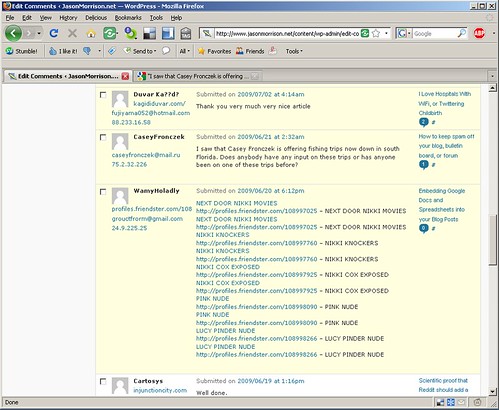
Here’s a screenshot of my pending comments a little while back. Notice the second comment, which slipped past Akismet:

o-rly-spam-comments1

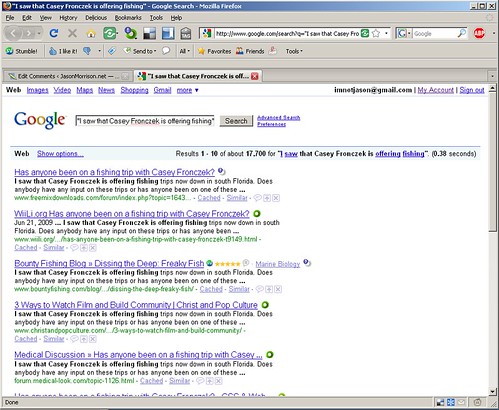
Apparently some dude named Casey Fronczek wanted to let my readers know about his fishing trips. I clicked on the O RLY button, and here’s what Google had to show me:

o-rly-spam-comments2

This spam comment showed up about 17,000 times!

This is an interesting case because it shows that spammers aren’t always looking to place links or pass PageRank. They are always looking for some kind of payoff though, and you can see the roundabout technique here. Hopefully anyone interested in fishing trips in southern Florida will Google this guys relatively unique name and result in a sale. You may also see phone numbers, ICQ or other IM accounts, and similar contact information in some comment spam.

This is a little tougher to automatically delete because a spammy link is a really good signal for an automated filter. Hopefully if people have enough little tools, we bloggers can improve the state of the web as a whole. Get the plugin from WordPress.org, and please let me know of other good anti-spam plugins in the comments.

Watch out for Google Money Scams

Friday, July 10th, 2009

I have a post up on the Official Google Blog: How to steer clear of money scams.

These get-rich-quick schemes are all over the place. They take advantage of the Google brand and the large number of people who are out of work now and looking for new opportunities. Read the article for more info but in general, if it looks too good to be true, it probably is.

The opening paragraph is a true story – so thanks mom, for asking about this an prompting me to look into this further.

I Can Actually Understand This! Contract and Legal Document Usability

Tuesday, July 7th, 2009

How many times a week do you agree to some endless block of legal terms and conditions in order to access a website or install some software? How often does your phone company, stock broker, or credit card company send you changes to some contract in the mail?

Of those, what percentage of the time do you actually read and understand the blobs of tiny print?

I logged in to iStockPhoto for the first time in a while and was confronted by a change to the artists’ agreement. I was shocked, absolutely flabbergasted, to find the document clear and easy to read. I’m not sure this has ever happened before. I actually understood what they were talking about. Here’s a screenshot:

usable-legal-terms

A few pointers on how to construct a similarly user-friendly legal document:

  • Put a quick, “plain language” description at the top.
  • Highlight text changes by coloring the new sections and visibly crossing out the removed text.
  • Include convenient contact information at the bottom for further help and information. By convenient, I mean convenient for the reader, not convenient for your company.

Legal document usability is so bad at this point that I would advocate changing the law so that any terms document that didn’t meet the three point above would be automatically null and void. Kudos to iStockPhoto for getting it right.