
Archive for July, 2008

Creating a Favicon

Thursday, July 31st, 2008

My site's favicon, blown up to ridiculous proportions Nelson reminded me today that I didn’t have a favicon for this site. I took a few moments and created the amazing little pencil that’s sitting in the address bar above.

For all the non-techies and new webmasters out there who have stumbled across this page, a favicon is the little icon that show up next to a web site’s URL and next to the page’s title in your bookmarks. They’re very small (16 by 16 pixels) but they can add a dash of branding to your site and are a helpful visual signal for bookmark navigation, increasing the information scent.

Want to create your own favicon? You can draw one pixel-by-pixel at this site, but I’d recommend busting out Photoshop and creating one yourself. Try to pick initials, a logo, or an object that can be expressed very simply - I used an apple for Mealographer, for example. You can go as simple as a couple of squares that fit your site’s color scheme and still create a memorable association for your users.

Modern browsers like Firefox allow you to use .gif and .png files directly, with some code like this:

<link rel="shortcut icon" type="image/png href="http://www.jasonmorrison.net/favicon.png" />

That means you can have an animated favicon… just make sure you’re doing it for some useful or artistic purpose, otherwise you will annoy your users.

From what I’ve heard Internet Explorer still has some issues, so you may want to use the older .ico format. This site will convert the image for you.

<link rel="shortcut icon" type="image/ico" href="http://www.jasonmorrison.net/favicon.ico" />

If you want to get really crazy, you can use Javascript to dynamically alter the favicon, which is great if you want to play Defender on the smallest display ever.
Sphere: Related Content

New search engine - Cuil search

Monday, July 28th, 2008

Reid posted a review already, but I thought I’d add my two cents about this new search engine, Cuil.

First off, it’s great to see more companies making a serious go at web search. I don’t speak for my employer (standard disclaimers apply), but I personally am always happy to see new attempts at information retrieval on the web. More competition can only make things better for users. Heck, I’ve even cooked up a bit of a search system based on my research into IR with tagging systems and folksonomies myself, though it’s too much of a toy to release to the public.

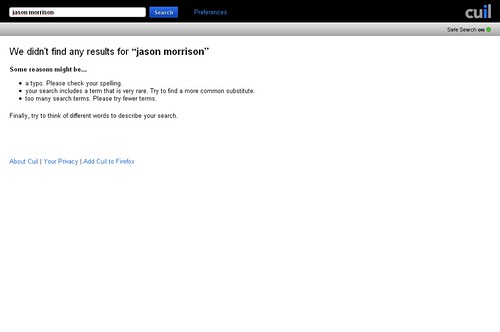
Second, it’s a bit underwhelming to see a ton of press coverage of a new search engine, load up the site and do a simple vanity search, only to see this:

Problems with Cuil search

I know I’m not exactly the most famous person in the world, but I do have a website. Really this is just the result of scaling problems - too many people hitting this brand new service at the same time. I can’t complain too much since if I ever released my little search system, it would fail at 4 concurrent users or so. But I also don’t think I could get the amount of press that they’ve managed to get either.

Third point, I don’t know much about their architecture and algorithms but from the about us page I thought this was kind of interesting:

The Internet has grown exponentially in the last fifteen years but search engines have not kept up—until now. Cuil searches more pages on the Web than anyone else—three times as many as Google and ten times as many as Microsoft.

Do they really think the main problem of web search is too few items in the index?

If you want to read more, Read/Write Web has a good review.

Sphere: Related Content

Problem with WordPress 2.6 upgrade - 404 errors

Friday, July 25th, 2008

Just a quick note - if you’re about to install the Wordpress 2.6 upgrade, make sure you don’t just check your homepage and then call it a night. On a site I help manage for some friends I ran into a huge bug - the upgrade went smoothly, the homepage looked fine, but all the posts returned 404 errors.

It’s apparently very common if you are using “index.php” in your URL structure, which many sites use because IIS doesn’t have an equivalent of Apache’s mod_rewrite or because their host doesn’t allow mod_rewrite for some reason.

The solution can be found in this thread on the WordPress support forums. Basically the solution is to get the latest copy of rewrite.php and copy over the version for 2.6. Here’s another post with a technique for category and tag pages.

There’s a lot to like about WordPress… the open-source codebase, the templating system, the extensible plugin architecture. But I’m starting to feel like I’m squeezed between a rock and a hard place - delay an upgrade and you run the risk of getting hacked; go forward with an upgrade and you run the risk of throwing 404s for your entire site.

Sphere: Related Content

Urban Usability - How walkable is your city?

Saturday, July 19th, 2008

Cleveland skyline from the Superior Viaduct I have a little project called Localographer, which you can use to create heat maps and find a house or apartment near your workplace, friends and relatives, or other place you’d like to be.  When I showed it to my brother he tried mapping out places in Boston and ran into a limitation - the interface doesn’t show you various transit options and it doesn’t make it easy to figure out the real cost and benefits of living in different places.

If you move to the suburbs, you might be able to commute by car but living by a train stop can be cheaper and easier.  In some neighborhoods you can get 10 different kinds of food in a 10 minute walk, in others you need to get in your car and drive a quarter mile to get anything to eat at all.

Adding features like this to Localographer means solving two problems - data and user interface.  I don’t have access to restaurant locations, transit stops, etc. and that sort of data can be expensive to get from commercial sources.  I could go the wiki route but that would require building an interface for users to contribute data and finding ways to make the data more reliable.

So in the mean time, if you want to get an idea of how walkable a potential neighborhood might be, take a look at Walk Score.  It’s a very cool site which has some of the features I’ve been meaning to add to Localographer - you can get a score for how livable the area around any address might be.

For example, my current neighborhood in California has a score of 74 out of 100.   Our house in Shaker Heights scores 62 out of 100.  Because any excuse is a good excuse to use a spreadsheet and a graph, I’ve plotted out the walkability of all the places I’ve lived using a Google Docs spreadsheet and the Interactive Time Series Gadget.  I wrote earlier about how you can embed any Google Doc or Spreadsheet into a blog post but Gadgets are even easier - just click the “Publish” button on the gadget and paste the Javascript code in the raw HTML view of your blogging software.

There are some issues with Walk Score, of course - for example Naples, Florida scores very high, but when I lived there I really missed having access to a car.  Most of the restaurants and shops along 5th Street and Tamiami Trail were out of my internship-funded price range.  I used to bike some distance to get to The Clock, a cheap diner.

All of this discussion is pointing toward a much larger question that I have been thinking about for a long time - I know how to study the usability of web sites and other software, but I wonder if anyone does usability studies of urban planning?  I’ve seen traffic flow studies and I know building codes have some basis in ergonomics and accessibility, but does anyone do observational studies of how people interact with different urban environments to figure out what works and what doesn’t?  Is there a Fitt’s Law of where to locate grocery stores compared to condos?

Sphere: Related Content

How to keep spam off your blog, bulletin board, or forum

Thursday, July 17th, 2008

Columns of gears in the difference engine Spam, it’s not just for breakfast and email anymore.  Webspam is a huge problem - if you run a blog or a forum, you’re probably familiar with the gobs and gobs of gibberish being posted all over the web by spammers.

This humble blog, which only gets a few hundred visitors per day, has had over 17,000 spam comments since I moved over to Wordpress last year.  Having your site inundated with comment spam can be just as big a headache as getting hacked.  No one wants to spend hours every day sorting the good posts from the bad.  I’ve already written about how to totally clear out a spammed forum and erase all traces of it’s reputation-marring existence, but the best solution is prevention.

Here are some steps you can take to help prevent spam on your blog or forum.

Keeping Spam off Your Blog

This section assumes you’re hosting your own blog and can add plugins and make configurartion changes, and my examples will be WordPress-heavy because I’m more familiar with WordPress.

Option 1:  Close or restrict comments. Most blogs give you some options to restrict who can comment on articles.  In Wordpress, you can require that users create accounts to comment under Settings -> General.  This might not help too much since I’ve seen hundreds of automated user accounts created right alongside the spam.

You can also require that comments are approved before they appear - in Wordpress look under Settings -> Discussion.  This will stop your blog from being graffitied without your knowledge but also requires manual effort.  You can also disallow trackbacks and pingbacks, which are really cool in theory but a major avenue for automated spam.

You can also shut down comments completely, or disable comments on old posts.  At that point you may be throwing the baby out with the bathwater, but it’s certainly effective.

Option 2:  Make sure commenters are real people with a captcha. Even if you’re not familiar with the term, you’re familiar with captchas.  They’re the little widgets at the end of a form where you have to decipher some scrambled text from an image.  Many blogs have captcha options built in, but if you’re looking for a captcha plugin be sure to balance usability with security.

I’ve used the Did You Pass Math plugin with some success.  Jeff Atwood has used an extremely simple captcha for years on his high-traffic blog.  Recaptcha is a really cool project that helps fight automatic posting and digitize old books at the same time.

Option 3:  Use an automatic filtering system. If you’re using Wordpress, I have three words for you:  Akismet, Akismet, Akismet! Seriously, Akismet is so good at automatically marking spammy commetns and trackbacks that it’s almost scary.  If you’re not using WordPress, you may still be able to find an Akismet plugin for your blogging platform.  There are other systems worth trying as well such as Spam Karma but I have less experience with those.

Keeping Spam off Your Forum

Again, I’m assuming you are hosting the forum yourself or can otherwise make config changes.  I’ll use phpBB (version 3) as an example because I’ve used it in the past.

Option 1:  Restrict user accounts. This can be a tough call, because when you start a forum you want to make it as easy as possible for people to join in the discussion.  Unfortunately, allowing anyone to register and begin posting without any admin approval also opens the door for spammers.

In phpBB this setting can be found in the Administration Control Panel under Board Configuration -> User Registration Settings.

Option 2:  Again with the captchas. Captchas aren’t 100 percent garanteed to remove spam but they do help.  If your forum software doesn’t have a captcha or a captcha plugin, I would seriously consider upgrading to a version that does or switching forums completely.  I know it’s a huge pain but waking up one morning to find 10,000 spam posts is even worse.

In phpBB3 look under Board Configuration -> User Registration Settings for a setting called “Enable visual confirmation for registrations” and make sure it’s turned on.  You can change the details under Board Configuration -> Visual confirmation settings.

Option 3:  Try to find an automatic filtering system. This is harder than for blogs.  There was an Akismet phpBB mod but it’s apparently not being maintained.  There’s a workaround involving the Spam Words mod that you can read about here.  The Spam Words mod might be worth trying on it’s own too.  Here’s a thread with more options for phpBB2, search around and find what’s available for your forum software.

Even without automated filtering, you can try to slow down the spammers by setting a time limit between posts (most human beings don’t type as quickly as spambots do).  Other options, such as disallowing links and BBCode, are pretty drastic but might make your blog less enticing.

Just for fun:

Spam, spam, bacon, and Spam

Sphere: Related Content

iPhone Apps - Pandora vs. Last.fm vs. iTunes

Monday, July 14th, 2008

San Jose Taiko rocking the main stage Since the release of the iPhone 2.0 firmware and the App Store, I’ve been like a kid in a candy store. At some point I’ll get around to a list of recommended apps but for now I just want to compare two music listening / online radio applications: Last.fm and Pandora.

You do, of course, have many more options - the App Store Music category has about 30 apps listed, many of them designed to help you enjoy and discover new tunes. And you always have the built-in iPod functionality of the phone which syncs with iTunes on the desktop. But Last.fm and Pandora have been around for a while as very impressive web apps so those were the first two I decided to take a look at. They have very different approaches to recommending music with lots of data and cool algorithms.

Pandora

Pandora is based on the Music Genome Project - basically, their system breaks down each song into a series of attributes. For example, Queen’s Bohemian Rhapsody has “demanding vocal performances, mild rhythmic syncopation, heavy use of vocal harmonies, a prominent rhythm piano part,” among other features. Give Pandora a song or musician and it will create a radio station of similar music. It’s really that simple.

As each song comes up you can give it a thumbs up or thumbs down and you can skip a few songs per station per hour. The iPhone interface displays the album art front and center with a button in the upper-right corner to show you why the system chose the song.

I’ve played with Pandora off and on for a while and my experience is that it does much better with stations created around one or two bands or songs than stations built on large lists of music you enjoy. Add 10 rock bands to your “Road trip with Steve 2008″ station and if one of them has folk influences you’re bound to get some sleepy folk in there now and again. Give it just one band and it can get some amazing results - check out my Gorillaz station, for example.

The drawback to Pandora is that it only has very rudimentary data collection and social features. You can find other people listing to the same song on the website but user profiles are pretty sparse, and there’s no groups, message boards, etc. But if you just want to listen, and don’t want to bother with all that other stuff, Pandora provides a pretty great experience.

Last.fm

Last.fm builds radios stations for you and makes recommendations based on the listening data of thousands of other listeners, whether they’re using the Last.fm site, the mobile app, or a scrobbler plugin in their desktop MP3 player software. You can also listen to stations based around a single musician or band, but Last.fm gives you more options and better results the more you listen and participate in the social features of the site. For example, take a look at the listing for Bohemian Rhapsody - you can see top listeners, how users have tagged the song, similar songs, comments, message board posts, etc.

The user interface is actually quite similar to Pandora’s, with options to note that you love or hate a song, a skip button, album art, etc. You can see a bio of the band, similar artists, and upcoming events, which is cool in theory but I haven’t really used.

I’m a long time user of Last.fm from back in the Audioscrobbler days (check out the Geek Music group) and you definitely get more out of it the more you listen. You don’t really have to participate that much, just letting Last.fm know what you’re listing to improves recommendations and radio plays. My favorite thing about it is all the stats it collects. You can see which bands and songs you listen to most often and find out the most popular bands in Sri Lanka.

Compared to Pandora, though, the recommendations aren’t always as interesting… not bad, but I find myself pleasantly surprised more often while listening to Pandora. For comparison, listen to the Gorillaz similar artists radio station.

iPod + iTunes

You can, of course, skip online radio altogether and just use the built-in iPod functionality along with iTunes on the desktop.  There’s a lot to be said for going this route - the interface is nice and usable, the iPhone holds a decent amount of music, and iTunes collects of the same listening data that makes Last.fm so cool.  Also, it will work no matter how conjested the local network is and doesn’t drain the battery nearly as quickly.

But you miss out on all the social networking features and it’s a lot harder to discover new music.  So I think of it more as a back-up plan…  guaranteed access to some of my personal music library.

The Winner

Actually, there’s no need to pick one as the winner - they’re all available for use on your computer and your iPhone.

Have a favorite?  Share your experience in the comments section.

Sphere: Related Content

Radio2.0 - Last.fm will pay royalties to independent musicians

Saturday, July 12th, 2008

Last.fm, a very cool online radio / music social networking site, just announced that it will pay royalties directly to independent musicians who upload their songs.

This is pretty important, for the same reason that Google’s Adsense was important (though probably a few orders of magnitude smaller impact). The Internet does a few things really, really well - quickly build network effects, encourage the creation of lots of long tail and niche content, etc. It also has the potential to cut out the middleman in economic transactions and help pay small-audience writers, artists, and musicians, so long as there’s a viable monetization system.

Adsense is that monetization system for a huge number of web sites, and hopefully things like Last.fm’s royalty program and CDBaby will be the engine that drives more interesting music online.

By the way, I started the Geek Music group a few years ago.  Feel free to join, your listening habits will help us determine the best music to put on when writing code.

Sphere: Related Content

Problem with iPhone after 2.0 firmware update

Friday, July 11th, 2008

My wife tried to upgrade her iPhone to the 2.0 firmware this morning. Everything went fine until the phone got to the stage where it has icons telling you to lug into iTunes and the message “slide for emergency.”

Plugging in to iTunes gives us this message: “We could not complete your iTunes Store request. The network connection was reset.”

I finally found a thread on Apple’s discussion board with a workaround - keep the phone plugged in, and in iTunes, keep switching between the iPhone and another function like Music. You’ll keep getting the same error over and over, but supposedly it will work after a few minutes of trying.

After about 20 minutes of this ridiculousness (you can use the ‘m’ key and ‘i’ key to switch if you get tired of clicking), it finally looked like it was going through…

Only to tell me “iPhone activations are unavailable at this time.”

Clearly Apple underestimated demand, and their serves can’t handle the number of incoming requests. That isn’t much solace for my wife, who can’t use her phone today.

In the usability world, the technical term for this is “epic fail.”  We switched from Palm devices to the iPhone to avoid this sort of craziness.

I have to go to work. Guess I’ll try again later… anyone have any other workarounds?

Sphere: Related Content

Embedding Google Docs and Spreadsheets into your Blog Posts

Sunday, July 6th, 2008

I just wrote a post about buying a new camera, and because I want to compare specs on several different cameras and lenses, I’m going to need a spreadsheet.  Luckily there are some great online spreadsheet programs to chose from.  I’m going to use this as an opportunity to explore how to use Google Docs and Spreadsheets in blog posts.

Before you get started I’m assuming you already have a Google Docs spreadsheet ready to go.

1.  You can always just link to the document. By default your docs will be private so you’ll need to make them available to your readers.  To do so you’ll need to either go to the Share tab and check “Anyone can view this document WITHOUT LOGGING IN at:” or go to the Publish tab and publish the doc. Either way you’ll get regular URL to post, like this one:  http://spreadsheets.google.com/ccc?key=ppevxmL24UqmeiZSbqIU1DQ&hl=en

Links aren’t very exciting though, so how can you embed into a post instead?

2.  You can embed the content into the post.  If you’re wondering how to do it in Wordpress, one solution I’ve come across is the Inline Google Docs plugin at Broken Watch.  This plugin gets the actual text/html of the spreadsheet and places it inline in your post.  So if you have a wide blog template, or a spreadsheet with relatively few columns, it should blend right in.  On the other hand, there’s no editing or other fun.

Here’s an example of what the output looks like:

CameraMPixLenswidetelezoomstabilized / VRweight (lbs)lens $total (lbs)total $
Nikon CoolPix 57005-352808N1.1
Nikon D406.1$430
Nikon D6010126 x 94 x 64 mm (5.0 x 3.7 x 2.5 in)1.2$600
NikonAF-S DX Nikkor 18-135mm f/3.5-5.6G VG181358Y0.85$260
NikonAF-S DX VR Zoom Nikkor 18-200mm f/3.5-5.6G ED-IF 1820011Y1.2$650http://www.dpreview.com/lensreviews/nikon_18-200_3p5-5p6_vr_afs_n15/
NikonTamron 18-250mm F/3.5-6.3 AF Di-II LD Aspherical (IF) Macro Lens1825014N1$415
NikonTamron AF 28-300mm f/3.5-6.3 XR Di LD VC (Vibration Compensation) Aspherical (IF) Macro Auto Focus Zoom Lens2830011Y1.3$540
NikonSigma AF 18-200mm f/3.5-6.3 DC OS (Optical Stabilizer) Zoom Lens1820011Y

3.  You can put the doc directly in the page with an iframe. This works really, really well with Google Presentations but is a bit trickier with a doc and even less optimal with a spreadsheet. You’ll get the best-looking results if you publish the document and use the published URL in the iframe. On the other hand if you use the shared URL collaborators should be able to make changes right in your blog post.

You’ll want to create some code like this:

<iframe src=”http://spreadsheets.google.com/pub?key=ppevxmL24UqmeiZSbqIU1DQ” width=”500″ height=”400″></iframe>

Make sure you put the code in the “HTML” editing mode of Wordpress rather than “Visual” mode.  As a result you can see some of the info I’ve gathered about possible camera / lens combinations in the spreadsheet below.

The main issue here is the relatively small iframe window size. If you use a wider blog template this technique might work really well.

Why bother? Spreadsheets aren’t the most exciting thing in the world for most people, but play around with all the features of Google Docs and Spreadsheets and you’ll see why this can be pretty cool.  You can embed questionnaires and surveys, cool charts and graphs with Gadgets, and anything else you can think of.

Sphere: Related Content

What Digital Camera Should I Buy?

Sunday, July 6th, 2008

A lizard in the leaf litter In addition to creating web apps, doing research, and pontificating on usability and social software, I like to wander around and take photos.  Until now I’ve gotten along pretty well with a Nikon CoolPix 5700.  It has a number of features that have turned out to be really, really useful - an 8x optical zoom that makes it easier to take photos from far away, a nice macro mode for very very close shots, and a swiveling LCD display that makes it easier to do overhead shots and candid photos.

But, it has a few limitations that I find myself bumping into again and again.  No vibration reduction, poor performance in low light, slow autofocus, and it definitely does not give you the kind of manual control that traditional SLR film cameras have.  So I’m looking into getting a DSLR.

I definitely want to get a new camera before our kid is born in November.  The only thing stopping me from running out and buying a DSLR is that I don’t want to turn my minor photography hobby into a major production - I like the relatively small size and light weight of my current “prosumer” camera, and the fact that I don’t need to carry 2 or more lenses around with me at all times.

So here’s my project:  to find a combination of camera and lens that gives me a nice balance between control, portability, and versatility.  I’m not as worried about super-high resolution (by the time you hit 5-6 megapixels, you can do pretty much anything you want with the prints), or having really professional gear.  Price is also a big consideration.

My guess is that I’ll have to try to find a small, entry-level DSLR and attach a “walking around” or “vacation” lens - something with a wide range, like 18mm - 200mm.  Another thing I’ll be looking into is automating geotagging - I’m a big fan of photo sharing systems like Flickr and Picasa and it would be great to have faster, more accurate place data on photos.

This definitely calls for a spreadsheet.  I have a tendency to approach major decisions with the application of spreadsheets and/or databases.  But before I start laying out facts and figures, any recommendations?  Suggestions on brand names, specific models, etc. are all welcome.  Please post in the comments below.

Sphere: Related Content

Great video on how to get your site back in Google

Friday, July 4th, 2008

Earlier I wrote a bit about what to do when your site has been hacked or spammed to the point where Google and Firefox start warning visitors away from your site.  If you find you site deleted from Google search results completely, you’ll want to file a reconsideration request.

Luckily, the Google Webmaster Central blog has a great post on how to make a request to get back into Google.  The post includes a step-by-step video.  You can also check out the Google Webmaster Help group if you have questions.

Sphere: Related Content