Posts Tagged ‘information-architecture’

Scientific proof that Reddit should add a tagging system

Tuesday, June 3rd, 2008

First, a disclaimer: the title of this post is obviously exaggerated. Proof is an awfully big word to throw around, and although I employed pretty good experiment design practices and statistical checks, I can’t really prove that Reddit should do this or that. But I can show that what they are doing now is not working, at least when it comes to search.

So, I got an email the other day letting me know that my article, Tagging and Searching: Search Retrieval Effectiveness of Folkonsomies on the World Wide Web, is being published in the July 2008 issue of Information Processing and Management (here’s the official DOI link to the article). In the study I compared search performance between traditional search engines (like Google), subject directories (like Open Directory), and social bookmarking systems (like Reddit) and their folksonomies.

What’s a folksonomy? The word is a play on the term taxonomy - a taxonomy is a system of organizing and categorizing things, like the Dewey Decimal System. Taxonomies usually follow very strict rules and are controlled by experts. A folksonomy is a system of organization built by large numbers of regular users, who add things to the collection, evaluate them, and usually tag them with keywords.

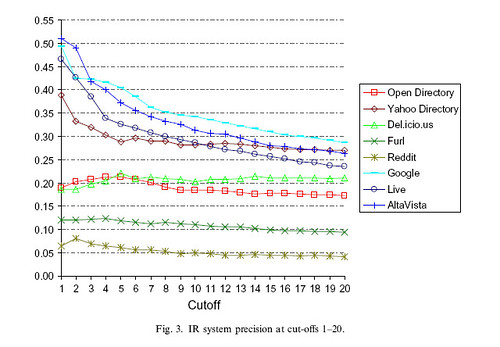
IR-system-precision-1-20

In my study, the social bookmarking systems with tagging systems did surprisingly well - Del.icio.us was more precise than Open Directory, and at a cut off of 20 results it’s precision was fairly close to that of the search engines.

Reddit, however, did not fare so well. It consistently had the lowest precision, meaning that searches returned very few relevant results. There could be many reasons for this, but the biggest difference between Reddit and the others is the lack of tags.

Now, it’s possible that the folks at Reddit have no interest in search, or information retrieval in general. I think Reddit is very effective at bringing out new and interesting links on a daily basis and encouraging commentary (just my opinion, no stats to back that up). But I think it’s a big missed opportunity not to add tagging and see where it leads.

(One last disclaimer: this post is my personal opinion as someone who enjoys using Reddit and does not reflect on my employer. This post refers to research done independently as a grad student.)

Sphere: Related Content

Tagging and Folksonomy artcle in the ASIST Bulletin

Sunday, November 4th, 2007

Walking to the overlook  The issue has been our for a little while now, but I thought I would note that I have an article about The use of tagging systems in this month’s issue of the ASIST Bulletin. Take a look at Why Are They Tagging, and Why Do We Want
Them To?

Almost everyone has a tagging system the web is facing serious weather with tag clouds on every site. I think it’s interesting to explore the uses of folksonomies and why users bother tagging things in the first place. Here’s an excerpt:

When thinking about adding tagging to a site, the first question should be: What do we want to get out of this? Does the site need something to improve search results or a new navigational facet to better connect related pages? Is the goal to classify lots of multimedia objects with minimal cost or to get users to interact with the site a little more?

Sphere: Related Content

Tagging and Searching: Search Retrieval Effectiveness of Folkonsomies on the World Wide Web

Wednesday, October 31st, 2007

To complete my MS in Information Architecture and Knowledge Management at Kent State I did some research on folksonomies and how the can support information retrieval.  I compared social bookmarking systems with search engines and directories.  I’m hoping to see the results published in an academic journal.   In the mean time, you can see a pre-publication copy of my results:

Tagging and searching [pdf, 989K]

Sphere: Related Content

Formal usability testing with eye tracking - Mealographer

Monday, May 15th, 2006

Usability Testing

Usability tests can be seen to fall into two general categories, based on their aim: tests which aim to find usability problems with a specific site, and tests which aim to prove or disprove a hypothesis. This test would fall into the former category. A search of the literature will reveal that tests looking to uncover specific usability problems often use a very small number of participants, coming from Nielsen’s (2000) conclusion that five users is enough to find 85 percent of all usability problems. Nielsen derived this formula from earlier work (Nielsen and Landauer, 1993). Although there is much disagreement (Spool and Schroeder, 2001), this rule of thumb has the advantage of fitting the time and money budget of many projects.

Use of Eye-Tracking Data

In terms of raw data, eye tracking produces an embarrassment of riches. A text export of one test of Mealographer yielded roughly 25 megabytes of data. There are a number of different ways eye tracking data can be interpreted, and the measures can be grouped into measures of search and measures of processing or concentration (Goldberg and Kotval, 1999):

Measures of search:

  • Scan path length and duration
  • Convex hull area, for example the size of a circle enclosing the scan path
  • Spatial density of the scan path.
  • Transition matrix, or the number of movements between two areas of interest
  • Number of saccades, or sizable eye movements between fixations
  • Saccadic amplitude

Measures of processing:

  • Number of Fixations
  • Fixation duration
  • Fixation/saccade ratio

In general, longer, less direct scan paths indicate poor representation (such as bad label text) and confusing layout, and a higher number of fixations and longer fixation duration may indicate that users are having a hard time extracting the information they need (Renshaw, Finlay, Tyfa, and Ward, 2004). Usability studies employing eye tracking data may employ measures that are context-independent such as fixations, fixation durations, total dwell times, and saccadic amplitudes as well as screen position-dependent measures such as dwell time within areas of interest (Goldberg, Stimson, Lewenstein, Scott, and Wichansky, 2002).

Because of the time frame of this investigation, the nature of the study tasks, and the researcher’s inexperience with eye tracking hardware and software, eye tracking data was compiled into “heat maps” based on the number and distribution of fixations. These heat maps are interpreted as a qualitative measure.

Methods

The goal of the study is to evaluate the usability of the web site and identify problem areas that might be improved.

Participants were solicited from a population of Kent State University graduate students in the School of Library Science (SLIS) and the Information Architecture Knowledge Management (IAKM) program via email. Five students volunteered, although one dropped out of the study at the last minute. Participants ranged in age from 25 to 35 with half female, half male. All had more than five years experience using computers and the web.

Participants were invited to the SLIS usability lab where they were informed of the procedure and asked for their consent. Once demographic data was collected, participants were calibrated on the eye tracking system and then asked to complete eight tasks using the web site. Participants were encouraged to “think out loud” while they attempted to complete each task, and their comments were recorded. Interaction with the web site was recorded by screen capture software and an unobtrusive eye-tracking device. Finally, participants were asked to fill out a short survey gaging their opinion of the site and it’s usability. Participants were free to stop at any time, and no incentive was offered for participation other than the opportunity to see the new lab and equipment.

Quantitative measures of usability include task completion, time required for task completion, and number of steps to completion. Participant comments and eye tracking data are used as qualitative measures.

Testing Difficulties

During the course of testing a number of problems arose with the eye tracking software, ClearView. At the conclusion of one of the four tests, the software locked up, making the computer unresponsive. Eventually it crashed, losing all test data for that participant. Consultation with a faculty familiar with the software confirmed that this is an unpredictable, but common bug in ClearView with no known workaround.

In addition, a deficiency was discovered in ClearView’s scanpath and hot spot visualization tools. Both overlay fixation data on top of screen shots of the web page the user was viewing. Unfortunately, the screen shots are not taken as the participant proceeds through each task. Instead the software remembers the URL of each page and then retrieves the screen shot at a later time. Many pages in Mealographer (and virtually any non-trivial web application) look different depending on whether or not a user is logged in, what the user has submitted in a form, and the presence or absence of cookies for session information. Therefore, many of the hot spot maps are laid over a version of the page dissimilar to what the participant had actually seen.

Findings

Task Completion Analysis

Overall, participants were able to complete the tasks 70% of the time. For the purpose of this evaluation, a task is considered complete only when the participant has found and used the expected feature for each task – often times, users were satisfied with their outcome, even though they had not used the most appropriate features. For example, two participants approached Task 1A by searching for a food they already knew was high in protein and low in fat, instead of finding and using the Healthy Food Search form. Table 1 displays the task list and completion rates. The tasks with the lowest completion rate were 1B, 6B, 7 and 8. It is interesting to note that the best-performing tasks include food search, meal entry, and user account functionality, which are the top items seen on the homepage when not logged it. This may be an indication of poor discoverability.

In general, the task completion rate indicates plenty of room for improvement.

Task Completion Rate 1. A. Think of a food that you like. Use this website to find out how much protein is in that food. 4/4
1. B. Try to find a food that is high and protein but low in fat. 1/4
2. Please find your way back to the Mealographer homepage without using the browser’s Back button. 4/4
3. Use this website to figure out how much fat and fiber you had at lunch today. 3/4
4. Sign up for an account. 4/4
5. Now that you have an account, please enter in what you had for breakfast today. How many calories did you have at breakfast? 4/4
6. A. Did you have more Calories at breakfast or lunch today? Find a way to figure this out. 3/4
6. B. Let’s say that you wanted to see a summary of your nutrition each day this week. Try to find a report that shows a week’s worth of information and look up your calcium intake. 2/4
7. Let’s say you wanted to try to have more than 25 grams of fiber each day. What’s the best way to make sure that you are with this web site? 2/4
8. If you were going to use this web site often, what would you do to make entering meals easier? If you can think of something, go ahead and do it. 1/4
Total 70%

Table 1: Task Completion


Completed Tasks

Incomplete Tasks

Number (recorded) 19 11
Average Time 1:56 2:37
Average Path Length 3.79 6.27

Table 2: Task Completion vs Performance Measures


Note that for the three participants with recorded times per task and path lengths, completed tasks took less time and involved a shorter path (see Table 2). This is logical, but with only three participants the correlation is not significant.

Individual completion rates, average times per task, and average path lengths are given in Table 3 along with user ratings of the site from the post-test questionnaire. It is interesting to note that user performance on task does not seem to correlate with user ratings (although with so few participants, correlations would not be statistically significant). The user with the highest completion rate gave the site the lowest ease of use score and lowest score overall, while the highest rating was given by a participant in the middle of the field for each performance measure.

Overall, the user ratings of the site were positive, but not outstanding. Although the ratings don’t correlate to the measures, many of the specific usability problems noted later in this report were noticed by the participants themselves as they used the site. Presumably changes to correct these problems would result in higher ratings.

Participant Completion Rate Avg Time per Task Avg Path Length Organization Rating Ease of Use Rating Design Rating
1 4/10 1:33 2.9 4 4 3
2 6/10 3:35 8.0 3 3 4
3 10/10 - 3 3 3
4 8/10 1:36 3.2 4 5 4
Total 70% 2:15 3.7 3.5 3.75 3.5

Table 3: Participant Performance and Site Ratings


Table 4 shows the task time and path length for each recorded participant broken down by task. Except for tasks 2 and 8, target path lengths for each task were set to the smallest path that would achieve the goal plus one, and target task times were set somewhat arbitrarily to 2 minutes. Task 2 was much simpler than the other tasks and task 8 was open-ended, allowing participants to enter favorites, usuals, or both. It is difficult to set a task time goal for an interactive web site without data from previous tests. The amount of time a user might want to spend on a particular activity before becoming frustrated or giving up may very based on a number of factors including user motivation, user enjoyment, and web site stickiness. The target of two minutes was chosen because it was thought to be fairly aggressive, meeting the goal of the project to make diet tracking quick and easy.


Participant 1 Participant 2 Participant 4 Average Target
Task Time Path Time Path Time Path Time Path Time Path
1. A. 1:10 3 1:55 4 1:33 4 1:33 3.67 2:00 3
1. B. 0:38 1 1:29 4 1:11 2 1:06 2.33 2:00 3
2. 0:08 2 0:17 2 0:17 2 0:14 2 0:30 2
3. 1:56 3 4:35 3 2:17 4 2:56 3.33 2:00 4
4. 1:18 4 1:19 4 1:56 5 1:31 4.33 2:00 4
5. 1:25 3 4:56 3 2:53 3 3:05 3 2:00 4
6. A. 1:51 3 5:26 14 1:52 4 3:03 7 2:00 3
6. B. 1:23 3 5:59 15 0:36 1 2:39 6.33 2:00 2
7. 1:16 4 3:29 8 1:30 3 2:05 5 2:00 5
8. 2:48 3 6:20 23 1:58 4 3:42 10 - -
Total 13:53 29 35:45 80 16:03 32

Table 4: Performance Measures by Participant


Items in Table 4 in bold denote tasks in which a participant had not met the target, and those with gray backgrounds represent successfully completed tasks. Looking at average performance, only tasks 1B and 2 completely met all objectives. It would be reasonable to look for specific usability problems in the tasks for which each participant missed one or more target, and many are addressed in the Specific Usability Problems section below.

Hot Spot Analysis

In Illustrations 5, 6, and 7, hot spot maps of the Mealographer home page are shown for three participants (one, two and four, respectively). These images show the relative number of fixations by color, with green meaning at least one fixation and red meaning three or more, with fixations length set to a maximum of 100ms.


Hot spot map for Mealographer user 1

Illustration 5: Hot spot map for participant 1

Hot spot map for Mealographer user 2

Illustration 6: Hot spot map for participant 2

Hot spot map for Mealographer user 4

Illustration 7: Hot spot map for participant 4

These hot spot maps illustrate some of the observations that can be made with eye tracking that might be missed by other usability testing methods. For example, participant one did not read the light blue help boxes at the bottom of the page whereas two and four did. The participants fixated on many of the red “* required” labels, but only briefly - this may mean that they served their purpose in alerting users without causing confusion or additional concentration. Note the large red areas under the drop-down boxes for “Month” and “Question.” Users had to fixate more on these controls than on many of the text fields.

Scanpath of user 1 looking for Coffee

Illustration 8: Scanpath for participant searching for “coffee”

Scanpath of an expert user looking for Tea

Illustration 9: Scanpath for expert searching for “tea”

Scanpath of user 4 looking for Coffee

Illustration 10: Scanpath for participant searching for “coffee”

Scanpath Analysis

The scanpaths in Ilustrations 8, 9 and 10 show the result of users entering in a search term on the meal entry form and searching for the proper item to add to their meal. The two on the left represent searches for “coffee” by two participants, novice users of the site. The one on the right is a search for “tea” by the researcher, and can be considered an example of expert use. Note that the paths of both novice users are both much longer than the expert, and that the convex hull area would be larger as well, despite the fact that the desired item is located in a similar position on all three. The novices need to gaze at each item on the list in order, and require more gazes on likely items in order to make a decision. In all three cases, the long, spread out gaze paths indicate that desired items are not near the top of the results, and are not readily apparent. Improvements should be made to the search engine and the results display, perhaps highlighting search terms within each line.

Specific Usability Problems

A list of specific usability problems has been compiled from the participant performance results in Table 4, observations made during the test by the researcher, and participant comments. Problems are organized by task.

Task 1A – Food search

Search results do not always match user expectations. Multiple participants expresses confusion or had to refine their search to get to the food they were looking for. As the tagging system grows, it will help to address this issue.

Search results are hard to scan. Participants seemed lost in all the text in the results. This can be addressed by highlighting the search terms within the results and visually dividing items from each other.

The ordering of nutrients on food pages might not be intuitive. The food pages were designed to match the ordering used on product packages, but some users needed extra time to find what they were looking for. One participant said she expected them to be in alphabetical order.

Task 1B – Healthy food search

Users did not notice the healthy food search function at first. Three users tried using the food search to search for a food they already knew was high in protein and low in fat, at least at first, and another was satisfied with the food he had just searched for by name. The healthy food search could be given more prominent placement, perhaps above the scroll on the search results page.

Task 3 – Meal entry using the quick form on the homepage

One user did not find the meal form on the homepage. Participant 1 used the food search instead, explaining that she had only had one thing to eat. Since the other found the form easily, action might not be needed to correct this.

Results for each food entered in the form do not match user expectations. One participant, for example, entered “rice” but did not find plain rice in the dropdown on the next page. This is another search engine difficulty.

Users could have refined their terms, but did not see a way to do so. In fact they would have had to go back to the homepage and submit the new terms. An entry box could be added to the results page to allow users to refine their terms.

Some users left some fields blank, and did not get useful results. One user left all the “Units” fields blank and the results showed a meal with no nutrition. It took some time for that user to figure out the cause of the problem. Validation hints could be added to the form, and units could default to one instead of blank or zero.

Task 4 – Account creation

Meals entered by visitors could be lost if they do not go directly to create a new account. One user missed the link to create an account from the meal page and went to the homepage first. This is a perfectly valid action. The ID of the temporary meal record in the database should be associated with the user session so visitors do not have to re-enter meals later.

Task 5 – Meal entry

It is not immediately clear how to use the meal entry form. Three users tried to click on the notepad at first, expecting it to work similarly to the quick meal form. Although both did figure out to use the search form to find and then add items, this could be improved. Currently when the form first loads, the search results frame is blank. An arrow graphic and some explanatory text might make use of this form more clear. It might also make sense to have only one meal entry form, mixing the strengths of each.

Users did not always try to modify search terms to improve results. At least one user suggested good modifiers when thinking out loud, but did not try any of them. There is text in the results that suggest trying again, but it could be made more clear.

Food search results were difficult to scan. Participants seemed to take a long time finding the item they wanted on the list (see Illustrations 8, 9, and 10 for scanpath diagrams). One participant suggested adding bullet points to better mark items in the list. Search terms could also be highlighted in the results.

Users are not sure how to enter complex or compound food items. One user tried “salad” and “caesar salad” but compound items with many variable ingredients like salads and sandwiches are left out of the database. Some instructions could be added. This might also be solved by the addition of a food or recipe entry system.

Some users left some fields blank, and did not get useful results. Like the quick meal form, validation hints could be added to the form.

Task 6A – Use of daily report

Some users didn’t think to look for a report system. Three users used pen and paper to compare meal totals instead, although two did later find the daily reports. The existence and functionality of the reports could perhaps be made more clear, and additional links might make the reports more discoverable.

Reports (and many other sections of the site) are not identifiable from browser history.

Participant 2 had a particularly difficult time finding the reports using the browser’s history function. Page titles were very similar, and he tried nine different links before trying another tactic. This is important because it means many pages would not make good bookmarks either. Better, more succinct page titles need to be used on interactive pages.

Reports cannot be accessed when not logged in. In the course of using the browser history, participant 2 accidentally logged himself out without noticing. This made it almost impossible to find the reports, and when he did find the reports they did not have any data. Care was taken to ensure users could not alter other users data, or make entries without logging in, but dynamic pages such as the reports should clearly remind users to log back in rather than displaying zeros. Once that is done links to the reports could be added to the tour page.

Task 6B – Use of weekly report

Users were not immediately aware of the weekly report. The control to switch to the weekly report is located below the scroll on the report page. It could be moved up or a simpler control could be added to the top of the page.

Task 7 – Goal creation

Users did not think to look for goal-setting functionality. Two users reported being happy just using the reports to track progress, though one later did find the goal functionality. Another user overlooked the link to create a goal at least once before finding it. Goals should be better integrated into the report pages.

The list of goals was confusing when no goals were listed. A new user looking at the list before entering sees the column headings but no indication that this is list with zero items. The list should not appear when no goals exist.

Some terms are unfamiliar to users. One participant did not know what “DRI” and “Daily Value” meant when entering a goal. Tooltips or links to a FAQ could be used to help inform users.

Task 8 – Use of usuals and/or favorites

The list of favorites was confusing when no favorites were listed. This is also true for usuals. The list should not appear when no favorites exist.

Favorites and usuals were not discovered by most participants. Three participants either did not think to look for such options or did notice them while using the site. Favorites and usuals need to be better integrated into the rest of the site. It might be helpful to indicate existence of favorites on meal page, even if user has no favorites. Also, an “add this food to my favorites” link could be added to food pages.


References Cited


Gibson, J. J. (1979). The Ecological Approach to Visual Perception. Hillsdale, NJ:Lawrence Erlbaum Associates.


Goldberg, J.H., Kotval, X.P., (1999). Computer interface evaluation using eye movements: methods and constructs. International Journal Of Industrial Ergonomics 24, 631–645.


Goldberg, J.H., Stimson, M.J., Lewenstein, M., Scott, N., Wichansky, A.M. (2002). Eye Tracking in Web Search Tasks: Design Implications. Proceedings of the 2002 symposium on Eye tracking research & applications. New York: ACM Press. pp. 51-58.


Golder, Scott A., Huberman, Bernardo A. (2006). Usage patterns of collaborative tagging systems.

Journal of Information Science, Vol: 32, Issue: 2, April 2006, pp. 198-208


Lindgaard, Gitte, Fernandes, Gary, Dudek, Cathy, and Browñ, J. (2006).

Attention web designers: You have 50 milliseconds to make a good first impression. Behaviour and Information Technology, Volume 25, Number 2, Number 2/March-April 2006, pp. 115-126(12).


Nielsen, Jakob. (2000). Why You Only Need to Test With 5 Users. Alertbox March 19, 2000. Retrieved May 15, 2006, from http://www.useit.com/alertbox/20000319.html


Nielsen, Jakob and Landauer, Thomas K. (1993). A mathematical model of the finding of usability problems. Proceedings of the SIGCHI conference on Human factors in computing systems. April 24-29, 1993, Amsterdam, The Netherlands. pp. 206-213.


Norman, Don. (2004). Affordances and Design. Don Norman’s jnd.org. Retrieved May 15, 2006, from http://www.jnd.org/dn.mss/affordances_and.html


Renshaw, J.A., Finlay, J.E., Tyfa, D., Ward, R.D. (2004). Understanding visual influence in graph design through temporal and spatial eye movement characteristics. Interacting with Computers. Vol: 16, Issue: 3, June, 2004. pp. 557-578.


Spool, J. and Schroeder, W. (2001). Testing Websites : Five Users is Nowhere Near Enough. CHI ‘01 extended abstracts on Human factors in computing systems. New York: ACM Press. pp. 285-286.


Stafford, Tom and Webb, Matt. (2005). Mind Hacks: Tips and Tools for Using Your Brain. Sebastopol, CA:O’Reilly Media, Inc.


Sphere: Related Content

Project report - Mealographer

Wednesday, May 10th, 2006

Abstract

Diet can have a great effect on health, but few people keep track of what they eat each day, let alone how much fat, protein, Calcium, or other nutrients. Although most food items have nutrition information printed on the packaging, few people can tell you whether or not the 10 grams of fat in their candy bar is acceptable, or whether it has put them over the edge.

In this project the author assumes that a big part of the reason people do not keep track of their diet is that there is no easy way to do so. The final product of this project is Mealographer, a simple interface that allows users to enter in the foods and meals they eat each day, set simple nutrition goals, and see reports of their progress. Mealographer was created by implementing a large number of improvements to the product of a previous investigation, WhatYouEat. A usability test was conducted to evaluate Mealographer and find specific usability problems.

Previous Work – The WhatYouEat Project

Mealographer inherits much of its functionality from a previous project, titled WhatYouEat, part of an individual investigation from fall, 2005. The original project had two goals: to create an application that allows users to track their dietary intake, and to make the application as easy to use as possible.

WhatYouEat allowed users to record their meals, set simple goals for different nutrients, and

track their diet through simple reports. Supporting functionality included a simple user sign up and login system, and systems allowing users to indicate favorite foods and “usuals” – foods eaten on a regular basis.

WhatYouEat was demonstrated informally to several groups and an informal usability test was run with four participants. Although this style of evaluation was not rigorous, users were asked to use the site and comment on any confusion or difficulties. Many users also commented on design and additional functionality. Usability issues included difficulty in:

Targeting

  • Even with a large screen size and large font, it was hard for one subject to click on fields before entering text.
  • Field labels were used to enlarge the clickable area. It may be possible to have the cursor will default to the first field.

Layout

  • Two users were a little confused about the two-column layout of input forms.
  • A thin line was added to help make the grid more clear.

Forms

  • Three users forgot to set the meal date at least once. The submit button was easy to miss. One user hit enter to submit the search form and didn’t expect the entire meal to be submitted. There were problems using the back button.
  • The submit button was made more visible
  • The forms were be broken up so that the submit button for a particular field only submits that field.
  • Required fields could be made more clear with a symbol and some JavaScript.

Labeling

  • Some labels were unclear or hard to read. In particular, dates presented in yyyy-mm-dd format and names of nutrients.
  • The labels should be changed to reflect user expectations.

Measurements

  • Many users had a hard time determining how much they had eaten, or understanding how much food each measurement amount actually represented. Few of them knew what an ounce or gram of a given food looked like, or how much of non-fluid items made up a cup.
  • Some graphic representation of food amounts should be available in the system, as well as a conversion application. See Future Plans for more information on the approach to this problem.

Missing items

  • Users more than once looked for food items that did not appear to be in the database at all. This included brand-name items or items from specific restaurants. This is a limitation for the USDA database.
  • There is no simple or quick solution to this problem. See Future Plans for more information on the approach to this problem.

Mealographer Features and Functionality

Mealogapher includes a number of improvements to the existing WhatYouEat functionality as well as some additional features. Major new and improved features include:

Information Design

WhatYouEat had simple, somewhat consistent design that did not convey much information about the content of each page. Mealographer was designed to

Action blocks – on each page where a series of actions are appropriate next steps, those actions are placed in a lighter-colored box with a descriptive title.

Simple icons – small icons are used throughout the site to quickly convey small bits of information. For example, purple arrows replace list bullets on action items in blocks. The Calendar employs icons to indicate whether or not a goal has been met.

Nutrition information – The nutrition information for foods and meal totals has been designed to match the familiar nutrition information boxes on foods.

Link highlighting – Many links, including the navigation bar and action items, have been given a highlight when the user’s mouse hovers over.

Language

Care was taken to make the verbiage used on the site straightforward, concise, consistent, and in line with the site’s brand. For example, when users are presented with options they are asked, “would you like to… Add another item to your usuals.” Users are addressed directly by the site, and not given static items like “Add usuals,” or “My usuals.”

Home Page

The homepage has been redesigned to be a central gateway, allowing easy access to site features, as well as an introduction to the site. The homepage has two different configurations: a “general public” version for site visitors and new users that have not yet logged in, and a “personal” version for logged-in users.

Public Homepage

The general public homepage was created with two goals in mind: first, to introduce new users to the site; and second, to intrigue and draw them in by giving them features to try out. The first goal makes sense since new users must know what the site does if they are to ever use it. The second goal was inspired by the fact that when presented with a choice, people generally chose to stay with the status quo (Stafford & Webb, 2005, p. 246). The status quo in effect when a user reaches a new, possibly complex web application for the first time is simple—do nothing. Mealographer presents an additional challenge, because most people do not actively track their diets. Using a diet-tracking site will be a big divergence from the status quo for many new users.

Mealographer user interface screenshot

Illustration 1: Public home page

The public homepage is intended to break visitors out of the status quo by giving them a simple, quick way to try the site out. The interface must be immediately apparent because users can make decisions about web designs in as little as 50 ms (Lindgaard, Fernandes, Dudek, and Brown, 2006). The way to make it apparent that a user can interact with a site is by presenting clear affordances, or visual impressions that imply likely use (Gibson, 1979, p.127). Cultural, learned conventions can be used to help users perceive affordances on a computer screen (Norman, 2004).

Visitors are presented with two elements to try. The first is the “What did you eat today?” quick meal entry form, which allows users to begin using the site’s functionality with as little investment of time and effort as possible. The second is a “Search for a food” form that acts as a simple search engine. In order to take advantage of cultural conventions, a multi-line text area was chosen to allow visitors to type in items they’ve eaten, and a single-line text input was used for the food search.

Personal Homepage

The personal homepage both acts as a central location for registered users to find and discover functionality and a top-level view of the actions they are most likely to want to do at the current time. Entering meals and watching diet changes are both activities with strong temporal dimensions. Accordingly, a daily “to do” calendar was chosen as the metaphor for the list of meals entered and yet to be entered, and a monthly calendar is used to display a high level view of progress. Both employ simple visual cues to give users an immediate impression. Completed activities are marked off the to do list with check marks, and smiling or frowning faces are displayed on the days of the monthly calendar to show if a goal has been met for each day.

Mealographer user interface screenshot

Illustration 2: Personal home page

The rest of the items on the personal homepage are organized into the action blocks “Connect to People,” “More Options,” “Goals and Reports,” and “Foods and Facts.”

Food Pages

Nutrition information about the food items in the database was used to generate a detailed page for each food. The pages include the nutrition information box, a food search form, and links to other similar foods in the database. They serve three purposes: first, users can search for and find information about a specific food. Second, the pages can be linked to from multiple locations in the site, wherever users might see a food name and want additional information. Third, the pages would be available to outside search engines, and might therefore act as landing pages for visitors and new users.

Mealographer user interface screenshot

Illustration 3: Example food page

Although the information is from the database, these pages are not dynamic. Instead, static HTML pages are generated from the database and then saved and uploaded to the web host. Nutrition information is unlikely to change, so this technique saves web server processing time and database access.

Food Search and Folksonomies

One of the most apparent usability problems of WhatYouEat was the food search. Food search is a standalone function and is an inherent part of meal entry, so it is critical that it be improved. Problems stem from three main areas:

Missing items – although the USDA database contains thousands of foods, it is missing many items users are looking for. Many brand-name items are not in the list, as well as ethnic foods and composite foods (there is no general entry for “sandwich” or “salad”). Possible fixes to this problem include searching for and entering new foods, allowing users to enter new foods, and allowing users to build recipes from multiple foods. None of these options were implemented in this time frame.

Naming and Labeling – the USDA database uses very precise names for many foods. These names are very useful for professionals, but do not match language used by typical users. For example, a user might search for “Coke,” when the database has “Carbonated beverage, cola, contains caffeine.” The solution to this problem implemented in Mealographer is a behind-the-scenes tagging system to build up a folksonomy for foods. Tagging systems can allow for both majority consensus on labels or search terms while maintaining minority opinions as well, and allow sites to harness information entered by users for personal use for wider benefit (Golder and Huberman 2006).

The tagging system implemented in Mealographer does not directly ask users for keywords for each food—that would be an extra step, and it is hard to see the immediate benefit a user would receive for their tagging work. Instead, as users perform searches, the system silently remembers the keywords used and the food ultimately chosen and builds tags automatically. A robust tag set requires many users, so it may be difficult to judge the value of the tagging system at this time.

Technical Limitations – by default, the search engine included in MySQL uses a fairly simple search engine which does not meet high expectations users have gained from using advanced engines like Google. In addition, the MySQL full text search ignores all works three characters or less. This can be useful in screening out words like “and” or “for,” but is less helpful when a user searches for “Big Mac.” As the folksonomy grows and tags are added, these limitations might become less important.

Healthy Food Search

In addition to searching for foods by keyword, an interface was created to allow users to search for foods by nutrient content. For example, a user can search for foods that are high in protein, or low in fat and high in fiber. Users may also filter by food group.

New User Invitations

A simple interfaces has been added to allow current users to send invitations to others via email.

Navigation

One finding from the presentations of WhatYouEat was the strong expectation among users to have a navigation bar near the top or left side of the screen. A navigation bar has been added with links to “Home,” “Foods,” “Meals,” “Favorites,” and “Reports.” Because the latter three items only work for registered users, those items are removed from the navigation bar for visitors.

Navigation is also facilitated by the user of appropriate action item links in an action box on most pages. For example, after a user enters a meal, they are given four options: “Make changes to this meal,” “Enter in a new meal,” “See your daily report,” and “Return home.” Users can use these to move from activity to activity in a logical progression.

Help and Validation

Originally Mealographer was going to include a help system such as a FAQ page. In order to more directly user test the interface, the help system was left out. A few new features do provide some user support, however:

Form hints and validation – On several forms, such as the new user form, required items are marked with “* required.” As the user completes each form field, the text turns from red to green.

Bug reports – Users are able to report bugs using the “Report a Problem” link in the footer of each page.

Tour – a page was added explaining the major functions of the site. The tour is shown as an action link after a new user signs up and is available on the footer.

Reports

WhatYouEat had a simple reporting system that allowed users to see bar charts for a particular nutrient for a particular time period. A user could see their total Calcium intake for each meal on a particular day, each day of a week, or each day of a month. A number of improvements have been made to the report system for Mealographer. Users are given a better system to see if they have met their goals, with bars falling short colored red and those meeting the goal in green. The monthly report has the calendar from the personal home page integrated into it. The reports now support a complete drill-down capability, with users able to go from month, to day, to nutrition details about a single meal.

Mealographer user interface screenshot

Illustration 4: Nutrition information report for a meal

The nutrition information report for meals is a new feature, reached via the other reports and displayed after a meal is entered. It includes a nutrition information box for the meal, a list of foods and amounts eaten, and a meal size graphic relating the size of the meal to an equivalent number of apples. The meal size graphic can help users judge their portion sizes.

Charts and Statistics

One benefit of building Mealographer as a web application is that the data for all users is available in the same database. This database allows the generation of interesting charts and statistics. For example, queries could be written find the most popular food in a particular state or city, the average calories consumed each day by users, or the weight of all meals entered all together.

Because of the limited number of users, only one such feature was implemented at this time – the popular foods list. The homepage includes this list, ranked by the number of times the food was used in a meal.

Social Features

Eating is a social activity, and dietary changes are often prompted and monitored by medical professionals. Two features were partially implemented (and are currently disabled) in Mealographer to address these facts. Users would be able to form social groups by inviting each other into their “circle,” and another feature would allow users to make their data available to their doctor, dietitian, or trainer.

Sphere: Related Content

A user-centered redesign of the Kent State SLIS site

Thursday, December 15th, 2005

Note: This was originally created for an information architecture class - the project was to redesign the Kent State School of Library Science web site. You can also see a usability study of the site.

Executive Summary

The current Kent State University School of Library Science (SLIS) does not meet the needs of the department. This project outlines a plan and strategy for designing a new site. The new site will better communicate the department’s image and core attributes to the outside world and better meet the needs of users. This report covers the entire process, from research and project goals, through the development of a new design and how to measure success. Major recommendations include the use of a simple content management system (CMS), a new navigation structure and graphic design, and a few new content elements such as news, video, and podcasts.

Introduction

This report will cover the overall strategy for the redesign of the Kent State University SLIS web site, including the site’s audiences, the vision for the site, and analysis of the content and maintenance. Finally, recommendation are made for the content, information architecture, and design of the new site. The ultimate goal of this project is to create a coherent analysis and plan for the SLIS department to execute. The result will be a site that better projects the image of the department, better serves the users, and, if possible, makes the staff’s job a little bit easier.

Site content has been updated, but the organization and design of the site has been the same since 2000. The web has changed a great deal in the last 5 years, and the Kent SLIS site look and feel is not exactly cutting edge. The faculty and staff have voiced a desire to update the site, and there is anecdotal evidence that at least some students find the site lacking. Any new design must better address the needs of the site’s audiences and should better project the image of the department to the outside world. Also, the process used to update the current site is slow and unwieldy. The new site will solve three main problems: poor ease of use, an image that does not fit the department, and difficulty updating the site and communicating with users.

The process followed in creating this report has included requirements-gathering meetings with SLIS faculty and staff, content analysis of the current site, analysis of server logs, brainstorming sessions with Information Architecture Knowledge Management (IAKM) students, analysis of similar sites, academic usability research, the creation of persona, card sorting exercises, wireframing, prototyping and other techniques. The report will recommend additional steps such as formal usability testing be taken as well.

Audience and Vision

Methods

Information about the site’s major audiences and the vision for the site were gathered through three methods. First the current site was carefully reviewed for content and organization. Second, a requirements meeting was conducted 9/14/04 with members of the department staff, including Rick Rubin, SLIS Director, Cheryl Tennant, Student Services, Anna Gower, Senior Secretary, and Rhonda Filipan, Academic Program Coordinator. In this meeting we discussed both who the site should serve and what the department want the site to convey. Third, a number of brainstorming sessions were conducted with IAKM students in the Foundational Principles of Information Architecture class with professor David Robins. This section presents the findings of these efforts and lays the groundwork for the site as a whole.

Audiences and user groups

This site must address the needs of a number of different user groups, including:

Current Students – This web site is, after all, the first place that many students will look for information about department policies, classes, faculty and staff, and other information. It can serve as an important means of communication between the department and students along with mailings and email.

Possible subgroups include full-time/part-time, new students/returning students, and students attending the various programs or attending at the different campuses. We believe that these distinctions should be addressed, but that often all students will be performing similar tasks and searching for the same kinds of information. New students will be given special attention, since they may have specific information needs. The different campuses (Kent vs. Columbus) will not be as separated as they are in the current site, although it is important that users not need to guess which information is campus-specific.

Prospective Students – Although the department did not identify recruiting as a problem area, the web site is a natural vehicle for prospective students to find information about the program, how to apply, deadlines, and other information. If the site addresses prospective students we can achieve two goals: first, bringing in a larger, more diverse pool of applicants, and second, saving time spent answering common questions and providing a central location to point prospective students to for all their needs.

Possible subgroups include recent graduates/returning professionals, and applicants could be grouped by the program they wish to pursue (for example, the K-12 program vs. the MLIS/MBA degree). We believe these groups will have a number of tasks in common and can be best addressed as lower-level subdivisions of the prospective student area.

Alumni – The department maintains active contact with alumni and there are alumni events, dinners, a newsletter, and an Alumni and Friends Council. None of this is immediately apparent from the current web site, although there is some alumni information under the “People” section. Although not a primary audience like current and prospective students, the Alumni are an important group with very different tasks and information needs that should be addressed.

Faculty and Staff – There is some information on the site that would be of particular use to faculty and staff, for example the “Request Software” form. The most important task that some faculty and staff members have, however relate to adding and updating content on the site. Because we recommend using a content management system (CMS) for the site, it is important to directly the needs of those who will be updating the site and handle issues like access control.

Other LIS Programs and Professionals – This is in some ways a catch-all category for other users with more general, informational tasks. Individuals in other LIS programs may be interested in the department’s mission statement, contact information for a specific faculty member, etc. Researchers, educators and journalists may also use the site to find description and contact information.

Persona

One way to specifically address the needs of users is by developing and applying persona—architypical users that help put a face on who will be visiting the new site. For this report, we give the example of Sally, a member of the prospective student audience.

Persona: Sally 25 years old / female / single / Stow, OH
“I want to do something in science or academia, but I’m sick of short-term jobs and moving around the country.”
Current profession: manager at Wal-Mart
Background: Sally graduated with a BA in Biology in 2002 and has since had a number of short-term positions in and out of her field. She’s worked as a lab tech, as a park guide, and even worked for a large zoo (mostly shoveling manure). In between “real” jobs, she has to do something to pay the bills-hence he current position at Wal-Mart.
Goals: Sally has heard about science librarianship and wants to find out more. She’d like to stay in Ohio but is willing to move. She wants to find a good school that will give her good job prospects.
Tasks:
1) Find out a little more about library science to see if it looks like something she wants to do.
2) Find out about requirements - GPA, GRE, etc.
3) Find out about deadlines for application.
4) Make sure a LIS degree from Kent can get her a job-what’s the placement rate?
5) Look at courses to see if any sound interesting.
6) Find a professor who teaches a science library course and get contact information.
7) Apply for admission.

Vision

Now that we have established who will be using the site, it’s important to determine what the department wishes the site to convey. A site can only convey so much information at once, and it is important to pare down the attributes we are trying to communicate so that they are clear and effective.

Most of this section comes from the requirements meeting, where the staff in attendance agreed that the site should convey the following.

Cutting Edge – this is a library and information science program after all, the faculty are conducting research and teaching methods on the cutting edge of the field, and this site should reflect that. Kent’s SLIS program that leans more toward technology than the humanities. This has implications for the site design—the site must be visually modern and striking, and employ an advanced information architecture and standards-based coding. The site should be accessible and printable.

Professional – Kent State’s SLIS program is specifically geared toward training professionals to go out into the world and work, whether it be in a public library, K-12 or even the private sector. Research and grants are not as important as quality teaching and placement. The site should project a very professional image. This should modify the Cutting edge aspect of the site somewhat—that means no fancy, pointless Flash animations—we are not here just to show off.

Caring – The library profession requires constant interpersonal interaction and few librarians get into the field because of money—instead they wish to educate others, spread knowledge, and support the democratic process. Kent State’s program is a nurturing place, a community, and the site should reflect that. An important aspect of this attribute that must be stated is a respect for Diversity. The panel members specifically mentioned their wish to reach out to groups and communities that are not currently well represented in the field.

These three attributes should be supported when making decisions on content and features, information architecture, and graphic design. How do we integrate all three of these attributes? Providing streaming video of professors would be a perfect example. Video is cutting edge, but can be done very professionally, and puts a face, voice and personality to the list of names on the faculty page.

Another example would be sample podcasts of lectures. This would have to be done on a volunteer basis, perhaps with permission of the university, but podcasts are one of the hottest new media on the web, allowing people to download audio programs to their MP3 players and listen at their leisure. Reputable organizations like NPR are making podcasts available and they also give a much more personal introduction to a course than a syllabus.

One more attribute should be mentioned, although this one is directed at specific user groups.

Authoritative – This is the official site of the program, and students should be able to trust the information they find here. That has important implications: content must remain up-to-date, content must be under editorial control, and content should be reasonably complete. It also means that highly interactive features like message boards, student blogs, and chat should probably be avoided if they can’t be kept under strict control.

Content Analysis

Content must be driven by two factors: what do audiences want to know, and what does the organization want to communicate? The SLIS site’s audiences are described in detail above. The new site’s content will be primarily composed of current content, reorganized, with a few new features. We believe that this fits well with the scope of the project.

The findings below are a result of careful analysis of the current content and navigation structure, other SLIS program web sites, and traffic logs.

Current content

Map of current siteThe current content supports many of the user tasks identified and does a fair job of meeting the organization’s goals, if the site design and organization does not. This makes sense because of the organic way in which the site has grown: most content has probably been added as new programs, facilities, faculty, etc. appeared or as staff members noticed users looking for it. Most of the changes we propose involve rearranging, reorganizing, and presenting the content more effectively.

The current content is divided into seven major categories. A sitemap diagram shows the first two levels of organization (Attachment 1). Other, similar SLIS programs have similar content. (See attachment 2). ….

New content

We recommend five major pieces of new content for the site:

1) News – The current site has a small news page, but it is not very visible, not regularly updated, and primarily consists of press releases. Creating a more visible and interesting news section can serve a number of site goals and a number of user groups. Regular notices about faculty publications and scholarships will look attractive to prospective students. Current student and other users that repeatedly visit the site, will notice the regular updates—credibility is enhanced by timeliness. Also, this will help serve the departments communications needs, working along side mailings, emails, and other methods of contact. It is important to note that this requires an additional commitment for the department.

Since this is not a portal, there is no need to update daily or on-the hour. The department should try to update the news section at least once a week, either with a press release-type item, important dates and deadlines on the academic calendar, new content available on the site, or even links to interesting library and information science articles in magazines or journals. If the CMS ultimately used for the site supports it, RSS feeds should be made available to highlight the department’s awareness of new and interesting technologies.

2) About library and information science – This content would be targeted specifically at prospective students. Although a large number of incoming students are already in the field, many come from different undergrad backgrounds or are looking for a later career change. The department has expressed a desire to attract a wider and more diverse field of applicants, and information about the field—what is studied, what careers in library and information science look like, descriptions of different programs—would help a great deal.

Unlike news content, this section would require a bit of work up front but could be useful without frequent updates. The new content would need to be written by someone in the department with an understanding of the different programs and the field. It’s possible the department already has flyers or mailings that could be used here. It is important to consider the main attributes listed above when creating this content—writing should be professional but personal. We are not selling library science, we are describing and explaining it.

3) Video – We highly recommend adding appropriate video to the site because it helps support the sites’ core attributes and goals. This idea was brought up during the requirements meeting. Right now each faculty member has the standard C.V. and list of interests. Adding a video clip where the faculty member introduces themselves and talks a little bit about their interests and classes would add a much more personal touch. In addition to pointing out the technological savvy of the department a simple, polished video presentation with decent lighting and sound would look very professional. Other areas that could benefit from a video introduction would be the distributed learning classroom, the Reinberger Children’s Library Center, and other facilities. It is important to constrain video to only subjects interesting to users, specifically prospective students.

Creating of this content would require further investigation, but it is very likely the department already has the resources to do this (or if not, can access resources elsewhere in the university). Faculty videos should be fairly simple to produce, but other videos might require a little more work to script and edit. Technical issues regarding video format and bandwidth should be left up to the web developers with the guideline that the end result be as easy to use as possible.

4) Existing documents not currently on the site – One measure of a site’s credibility is breadth in coverage. It is hard to convince current students that the web site is a “one-stop shop” for information if they find items missing. This includes additional forms, pamphlets, mailers, etc. produced by the department. At the very least, PDF copies of other publications should be made available on the web site. Anything produced for public release should be on the site, with exceptions made for documents that are confidential, must be placed elsewhere (on the university home page, Vista, etc.), or are otherwise inappropriate.

5) Podcasts – Although audio on the web is nothing new, podcasting has grown quickly since it’s start in 2003 and Apple’s addition of podcasts to iTunes in June. “Podcasting” is a misleading term, since they are not limited to iPods and do not employ traditional broadcasting. In essence audio is recorded and then published online where users are able to subscribe, download, and listen at their leisure. We believe podcasting a few lectures each semester would give a big boost to the department’s cutting-edge image and might create interest in the department and classes in new ways. Faculty members would be encouraged to take a look at their lesson plans and pick a class they wouldn’t mind having recorded and made available—the first day of class, for example, or a lecture on a subject they’ve done research on.

This content presents a few challenges that would have to be overcome. Any participants being recorded would need to know ahead of time about the recording and volunteer. The university’s legal department should be consulted. Recording should not be too difficult, with computers available in almost every classroom, although a microphone and software might need to be purchased (or borrowed). The web developers will need to make sure that uploading and publishing of podcasts is possible through the site’s CMS.

Publishing Content

The current method of publishing content on the site must be improved in order to support the goals of the department and reduce workload. Currently different sections of the site are the responsibility of different staff members. When an update needs to be made to an existing page, the staff member in charge prints out the page, makes the changes, then hands it to the network administrator. New content is sent to the network administrator as well. This results in a time lag to get any changes on the site and some duplication of efforts.

In order to keep the site up-to-date, support new content mentioned above, and cut down on the amount of work, we highly recommend the new site use a CMS instead of static web pages. The network administrator’s time is often limited (and upcoming organizational changes may leave the department without their own administrator). Training a staff member to update and manage a static HTML web site would take time and none of those present at the requirements meeting expressed real interest.

We believe one staff member should be designated as the main contact for web site updates with others serving as backups. The main contact would be in charge of the news section and most updating, although different staff members may still be in charge of their own section.

The CMS must meet the following requirements:

1) Stable – once the web developers have set it up, it must require minimum maintenance work. That means we should limit our search to well-regarded commercial software or mature open-source applications.

2) Affordable – some commercial CMS’s cost tens of thousands of dollars. This system must fit well within the department’s budget.

3) Simple – This site does not require many of the features and functionality that some CMS’s provide. For example we have no need for message boards, live chat, student logins, and blogs. It should be as easy as possible for the staff to update the site.

4) Functional – the CMS must support the site’s requirements, meaning we must be able to update a front-page news section, post files such as PDFs and Word documents, link to video and audio, and support the desired information architecture.

Site Redesign

Requirements

We have three overarching requirements. First, the department’s web site must support the tasks of user groups we have identified:

  • Current students
  • Prospective students
  • Alumni
  • Faculty and staff
  • Other programs and professionals

The five groups have one thing in common: their task sets are by and large limited to information-seeking. Some times this is part of a larger task, such as prospective students wishing to apply of admission or current students wishing to select classes. The SLIS website, however, is used in information gathering stages of these tasks rather than final execution.

Second, the site must actively project the key attributes of the department:

  • Cutting Edge
  • Professional
  • Caring

Finally, the site must support the department’s need to communicate effectively. This includes different kinds of communication to different user groups. For example the department may wish to use the website to both answer current student’s questions about graduation while also attracting prospective students doing general web searches.

Functional Requirements

We believe the requirements listed above imply that the new site:

  • Contain a user and task-driven primary navigation structure, with other parallel navigation structures a possibility.
  • Contain content to address those users’ needs, including the current content and new content identified above.
  • Be designed to express the department’s attributed visually.
  • Have a CMS so that updating and managing content is much easier.
  • Support serving and organizing PDF documents, audio, video, and other files.
  • Support modern, accessible, standards-based markup that is search-engine friendly.

Goals and Measurement

Without measurement we cannot be certain that the new site has met our goals. Three key areas of interest brought up during the requirements gathering meeting included:

1) Ease of use – Users must be able to find what they are looking for easily. This was phrased mostly in terms of task completion, although other measures (such as time to complete or steps to complete) may be useful as well. We recommend running a formal, but small usability test with the current site and then with the new design, comparing results. For the test, four or five members of each group should run through a small number of representative tasks. If it is necessary to cut corners due to time constraints we would recommend running the test with the current student user group, since they would be the easiest to recruit and work with. For each task we will record and compare the completion rate, the average time per user, and the average path length (number of clicks) to completion. It would be nice to run a usability test with content creators (staff members) as well, but we would have no earlier system to compare to and (depending on the CMS chosen) less flexibility to make changes in the future. One other measure might be the number of calls and emails sent to staff about information already available on the site. Staff members could be asked to keep a count of such contacts for a few months while the current site is in operation, then keep a count after the new site has come online to compare.

2) User opinion – Users should be polled about the old site and the new site to determine two things: do they like it, and what does it say to them? The former can be measured with a Likert-type scale and the latter by word association. Users could be asked to simply list words to describe the site, or pick words from a list, and the results matched against the site’s attributes. This could be folded in as part of the usability study.

3) Comparison to other SLIS sites – this is a broader area but could be measured in several ways. The first would be a survey asking appropriate user groups (prospective students for example) to look at and then rate the Kent State SLIS site versus several others. Another measure could be search engine ranking—target search phrases would be run on a popular search engine like Google and the site’s page rank recorded. This last method would be easier to do and could measure the new site versus the old, but would be a less direct measurement. Another measure might be an increase or increase in diversity of the applicant pool, although it is hard to eliminate external variables from that measurement.

Site Functions

Navigation

There are a number of ways that a web site can be organized, but the most important concern for an informational site such as this is that users are able to find what they are looking for. This means that a generic, org-chart navigation will probably not be very successful—most users will not know or care how the department is organized. Many department web sites a hierarchical navigation structure using common subject areas such as “programs,” “courses,” and “people.” Three schools identified by the department as similar or competing institutions, organize their sites into major sections this way:

University of Kentucky School of Library and Information Science: University of Pittsburgh Department of Library and Information Science Wayne State University Library and Information Science Program:
Main Navigation Links:
General Info Academics About Us
Academics Degrees Degrees & Certificates
Admissions People Admission & Fin. Aid
Courses About DLIS Courses & Schedules
People Services & Policies
Facilities People & Groups
News Calendar & Events
Jobs & Resources
Forms
Student Handbook
LISAA (alumni association)
Sidebar Links:
Mission Prospective Students
Newsletter Current Students
Our College Faculty & Staff
UK Libraries Alumni & Visitors
Student Info Update Research Projects
Contact Us The Fine Institute

From these examples two things are clear: first, it is common to include more than one method of navigation (with both a main navigation bar and a sidebar of links on the homepage), and second, that these departments tend to be organized into sections (by subject) similar to the current Kent SLIS site.

New navigation structure diagram

Since we have such well-defined user groups, however, we do not believe that is the best structure for the primary navigation scheme. Instead, we will use a faceted organizational scheme with the primary facet addressing each user group individually and a secondary navigation structure by subject.

Primary Navigation: User groups and tasks

Wireframe mockup of site designThe first four user groups are easiest to address directly, with Prospective Students and Current Students the primary and Alumni and Faculty and Staff as secondary target audiences. The more nebulous Other Programs and Professionals group is probably least important and is probably least likely to self-identify. The home page and user-group based navigation should reflect the relative importance of the different audiences, with the first two at the top of the list, taking up more screen real estate. The second level navigation will be by task. So, for example, the user might go to the home page, identify themselves as a current student, and from there choose a link labeled “find courses” in the second level. (See attachment)

Wireframe mockup of site designOn the homepage we will have a navigation area with a section for each of the user groups. Within each section will be a few top likely tasks with direct links. Clicking on the sections takes users to a landing page directed specifically at them, with the full task list, and each task-level link will either hit a further landing page or go direct to the resource that fulfills the task.

Secondary Navigation: By Subject

Wireframe mockup of site designThere will be a secondary navigation area or sidebar with the traditional subject-category scheme, similar to the current navigation structure. The subjects will include:

  • About SLIS (includes current About Us section)
  • Library Science (includes new content about the field)
  • Programs and Degrees (includes current Programs section)
  • Courses (includes current Courses section with any new content)
  • People (includes current People section)
  • Resources (includes current Facilities and Links sections)

Labeling

Wireframe mockup of site designIt is extremely important that labeling follows or accommodates user language as opposed to unfamiliar department or specialist language. Each of the user groups should be addressed directly. So it is less appropriate to use jargon with prospective students than current students. The page for the “12-12-12 Distance Degree Program” is a good example: a link for prospective students should identify it is “Distance Degree Program,” “Distance Learning,” “Off-campus Master’s Degree,” or something similar, since “12-12-12” will not mean anything to most incoming students. Links to the same page from the current student pages could use the “12-12-12” label, so long as it is what students use to refer to it.

We will also strive for clarity in labeling. The site’s graphic design must be able to accommodate longer labels and link titles where appropriate.

Design Ideas

Design mockup

Design mockup

Search

Search is extremely important in any site with sizable content. Although we take great pains to organize the site so that users can find what they are looking for quickly and easily, many will prefer to simply type in keywords rather than navigate.

Further, a large number of the prospective student group will come to the site by search engine rather than through the university, or department home page. Making it easier to find the department, or department pages, from the outside world can only help. That means that it is imperative that:

  1. The CMS chosen or developed for the site must create standards-complaint, readily-indexable web pages
  2. The CMS must create search-engine friendly URLs
  3. The site’s navigation must make it clear the context of the each page within the site, in case a user comes to that page directly (this also rules out the use of frames).

We do not recommend creating a search engine from the ground up for this site. That would be a large scale project in and of itself, and the return would probably not be worth the investment. Instead we recommend using either the CMS’s built-in search capabilities or a popular engine like Google, or perhaps both (on an “Advanced search” page).

Sphere: Related Content

Metadata Schema for Radiological Terrorism Research

Friday, April 30th, 2004

Note: this was a project for a graduate course in Knowledge Organization Systems


Metadata schema for radiological terrorism research (MSRTR)

Terrorism research is a complex field dealing with a number of entities, each with their own metadata requirements. This document is an introduction to the kinds of schema that will be necessary for proper cataloging, identification, and retrieval in the radiological terrorism subfield. Schema for radioactive material sources and radiological terrorism responses are presented below, followed by sample records and a crosswalk between the two scheme and the Dublin Core. Schema were made as simple as possible (8 and 6 main fields, with several qualifiers, respectively) in order to make application quick, easy and consistent.

Fields are described in the following format:

  • Field Name
  • Qualifiers: additional subfields
  • Definition: a description of the field and usage
  • Data Values: notes whether data is controlled or uncontrolled, and if controlled the terms allowed or the source of terms allowed.
  • Status: cardinality of the field (recommended, required, optional)
  • Number: number of entries allowed for each record for this field (single, multiple)
  • Dublin Core: corresponding field in the Dublin Core. This information is repeated in the crosswalk as well.


Metadata for radioactive material sources (RMS)


Identifier

  • Qualifiers: None
  • Definition: Code number used to identify source in database.
  • Data Values (controlled): Auto-generated database identity field values
  • Status: required
  • Number: single
  • Dublin Core: IDENTIFIER


Name

  • Qualifiers: None
  • Definition: Way in which a site is identified, for example the name of a hospital, power plant, mine, etc.
  • Data Values (uncontrolled):
  • Status: required
  • Number: multiple
  • Dublin Core: TITLE


Owner

  • Qualifiers: None
  • Definition: The name of the person, company, government, or other organization that owns the source.
  • Data Values (uncontrolled)
  • Status: recommended
  • Number: multiple
  • Dublin Core: CREATOR


Location

  • Qualifiers: Location.Coordinates, Location.Country
  • Definition: Physical location of source.
  • Data Values (controlled): ISO 6709:1983 for Coordinates, ISO 3166 Country Codes for Country
  • Status: recommended
  • Number: single
  • Dublin Core: COVERAGE


Level

  • Qualifiers: None
  • Definition:
  • Data Values (controlled): high-level, low-level
  • Status: recommended
  • Number: multiple
  • Dublin Core: TYPE


Type

  • Qualifiers: None
  • Definition: Radioactive waste is categorized according to its origin and not necessarily according to its level of radioactivity. For example, some low-level waste has the same level of radioactivity as some high-level waste. (http://www.epa.gov/radiation/docs/radwaste/index.html)
  • Data Values (controlled): spent nuclear fuel, transuranic waste mainly from defense programs, uranium mill tailings, low-level waste, naturally occurring and accelerator-produced radioactive materials.
  • Status: recommended
  • Number: multiple
  • Dublin Core: TYPE


Description

  • Qualifiers: Description.Facility, Description.Security, Description.Storage
  • Definition: Text description of the facility, security, and storage methods.
  • Data Values (uncontrolled)
  • Status: recommended
  • Number: single
  • Dublin Core: DESCRIPTION


Isotopes

  • Qualifiers: Isotopes.Present, Isotopes.Potential
  • Definition: Radioactive Isotopes either present or potentially present at the source.
  • Data Values (controlled): IUPAC isotope symbols
  • Status: recommended
  • Number: multiple
  • Dublin Core: DESCRIPTION