Posts Tagged ‘tagging’

Twitter user directories – Wefollow vs. Justtweetit vs. Twellow

Monday, March 16th, 2009

I happened to notice Brian’s tweet that he is officially the sole authority on burritos in Twitter, at least according to Wefollow, a Twitter user directory.

Twitter is the only major service I can think of where sites have popped up to provide a function so basic as user directories. This is due in part to their great API, but also because they don’t provide any real functionality on their site. You can search for users individually and import your contacts, but the suggested user page seems uselessly weighted toward the most popular people on the entire site.

Who should I follow if I’m interested in usability or cartography or legume horticulture? I took a look at a few directories, which follow slightly different models:

justtweetit.com
- Has a list of predefined categories
- Each user can only be in one category
- Users are self submitted

wefollow.com
- Users can be tagged by any word or phrase, though the most popular show up as main categories on the home page
- Each user can use up to three tags
- Users are self submitted

twellow.com
- Has predefined categories, a large list that looks similar to Open Directory.
- Each user can be in up to 10 categories
- Seems to pick up users automatically, but users can add themselves to additional categories

My guess is the more specific the categories, the more useful the organization system will be. Wefollow gets points here for allowing open tagging but the front page, with such broad categories, isn’t as useful as the search or drill down pages. Twellow actually works pretty well, since the built-in category list is so extensive.

All three seem like they might be a bit open to abuse, since users can add themselves to the directory – with Twellow and Wefollow, at least they have to be logged in to their account to do so. But if I were a spammer and had found some way to use Twitter for spam, I could quickly add my spam accounts to these sites as well.

It would be really interesting to see a measure of quality other than just the number of followers. For example, if I say I’m in the haberdashery business, the system could check to see how often haberdashery shows up in my tweets – that could be a quality score for the classification, used in concert with number of followers, which is a proxy measure for the quality of my account.

Has anyone else used these directories, or others? Would you follow someone just because they’re the most popular person listed in your area of interest? Let me know in the comments below.

Sphere: Related Content

Map Apps of the Day: Islands of Music and the Continental Zodiac

Monday, February 16th, 2009

Two interesting uses of maps today, one is a completely non-geographical map that illustrtaes data while the other is a completely artistic use of geography.

Islands of Music

Last.fm is  a great service – I’ve written about it before.  The best thing about it is the copious and collection of interesting data on music tastes (you can even see how geeky your taste in music is).

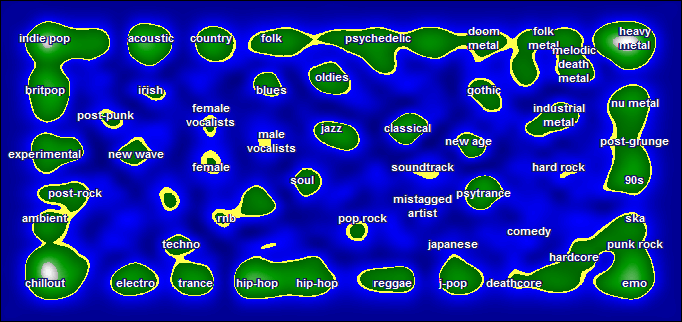
Like many other web sites Last.fm has a tagging system, and so it interesting to see how different tags relate to each other – are hip-hop fans more likely to listen to ambient or heavy metal?  One very cool way to do this is with a map.

islands of music from last.fm

See the orginal version here, complete with mouseover descriptions of the different islands.  Visualizing music tatses as a map makes some interesting findings pop out – the long continent of folk, psychadelic, and metal in the northeast, for example.  Deathcore and emo are on the same continent, just on opposite sides of what I call You-Don’t-Understand-Me-Dad Bay.

This is an alternative to more conventional tag cloud or word cloud representations, though I’m not sure which presents information more clearly.

Another thing that strikes me is the similarity to video game maps – perhaps because of the iconic color palate.  Though we might think of them geographically, video game maps are equally artificial ways to relate to a big pile of numerical data.

World maps as Chinese zodiac

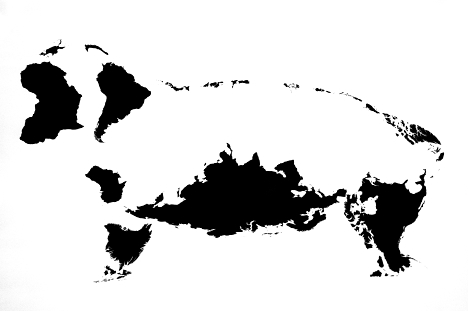
Artist Kentaro Nagai has used the continents (and major islands) as a medium to create the twelve signs of the Chinese zodiac.  See all of them here.

I particularly like the economy of arrangement in the rooster:

Rooster from Chinese zodiac

…and the sheep for it’s nice use of negative space.

The sheep from the Chinese zodiac

Thanks to Chris for the link to the Zodiac

Sphere: Related Content

New social news site – NewsTrust.net

Tuesday, August 26th, 2008

I happened across NewsTrust.net, a new social news aggregation site.  I’m a big fan of other sites in the category like Reddit, despite their flaws, and NewsTrust includes a tagging system so I feel obligated to investigate it like any other folksonomy.

So I created an account to give it a try.  The big difference between this site and others is the emphasis on quality journalism.  NewsTrust asks for your real name, and in addition to giving weight to users who write good reviews and get votes from other users, it adds factors like experience as a journalist to the mix.  It makes specific disticntions between mainstream media sources and altenrative media sources.

It’s an interesting idea, and it’s good to see journalists working together with programmers and web developers to make use of some of the social software techniques that newspaper websites so often catch on the trailing edge.  The site’s features seem geared toward providing users with the best that professional journalism has to offer with a dash of brilliant amateur writing thrown in – even the page layout looks more like a newspaper site than a Digg or Del.icio.us clone.

But I’m not sure it will work, at least not without some tweaking.  I don’t know if they put a lot of weight into the “experience” of users, but it didn’t require any verification of my 5-9 years of journalism experience (for the record, that’s four years in college plus more than a year of stringing here and there).  Here’s the problem of trust again, though hopefully mitigated by fellow users’ reviews.

The other issue is interaction design.  The widgets and buttons all work just fine, but when you rate a story you’re asked to score on six dimensions: Recommendation, Trust, Information, Fairness, Sources, and Context.  Only the first is required, but give users options and they are bound to feel obligated to exercise them.  Give them too many tasks and they will tend to give up.  So the simple interaction model of Reddit, where users don’t even have to click through to rate a story, might be information-poor but participation-rich in comparison.

Still, I will play with the site more and I wish them luck, I think they have some promising ideas.  For example, in their blog they talk about gathering sources from other countries based on big world news events, specifically the Russian invasion of Georgia.  Reddit is only fleetingly so reflective and few sites use temporary peaks in interest to get long-term data on source credibility.

Sphere: Related Content

Update to Altocumulus Wordpress Tagging Plugin – version 0.2

Wednesday, August 6th, 2008

Screenshot of my tag cloud Wordpress plugin in action

Everyone has tag clouds all over the web, but are they really useful?  Altocumulus is an attempt to use tag clouds as a real navigational system in Wordpress blogs.

Install the plugin and it will automatically put a cloud of related tags at the top of all your Category and Tag pages.  Hopefully this will serve two purposes:

  1. Users who end up on a general category page can click through to a more specific (or more relevant) tag page, and
  2. It should give users a general idea of the topic of the posts on that archive page, increasing the information scent.

Next version I’ll add an options screen where you can change the number of tags, placement, etc.

Please drop me a note if you run into any bugs or are using it on your blog.  Let me know if you have any ideas you’d like to see implemented, too – I am all about implementing and studying folksonomies.  The more folks who are interested, the more likely I am to add features.  Thanks.

Download the Plugin Here

Sphere: Related Content

The power of microformats

Monday, December 3rd, 2007

Considering a Descent A few months ago I attended a really interesting talk by Eric Meyer where he touched on the use of microformats.  You might know Eric from his excellent O’Reilly Press CSS books.

What are microformats?  Before giving an example, I’ll give a little context.  When Tim Berners-Lee created the web, he tried to make HTML simple, flexible, and meaningful.  He succeeded on the first two counts but the third was quickly left by the wayside – many designers didn’t care what a particular tag meant, so long as it could be used for page layout.  The use of tables to arrange graphic elements instead of holding tabular data is a perfect example.

So Berners-Lee has been talking for years about the next step – the semantic web.  In the semantic web, tags are used to say what a particular piece of content is, with all styling done with stylesheets.  There is, of course, more to the semantic web than just separating content and presentation, after all you can work that way with HTML and CSS now.  One other key component is the web of trust, where people and web sites are able to describe relationships to each other so that search engines can help you find trustworthy content automatically.

Unfortunately, the semantic web has not really taken off.  There have been lots of meetings and XML schemas but it’s all too complicated, the process is too bureaucratic, and everything is being designed from the top down.

This is where microformats come in.  Let’s say you have a blog and you’ve tagged all your articles.  You’d like to let search engines and aggregators like Technorati know what your tags are.  But HTML doesn’t have anything like this:

<tag>semantic web<tag>

So what do you do?  Simple, use the rel-tag microformat:

<a href=”http://example.com/tag/semantic+web” rel=”tag”>semantic web</a>

The microformat makes use of existing html tags and attributes and just follows simple conventions.  But now that this little bit of meaning can be interpreted by spiders and other programs, we’ve actually added a pretty powerful bit of functionality to the web.

Most blog software, including WordPress, includes does microformatting for you.  If install my tag cloud plugin Altocumulous, and view source, you can see for yourself.

For intranet purposes, the hCard and hCalendar microformats look promising.  Take a look at microformats.org to see why I think so.  I’ll write more on it later.

Sphere: Related Content

Video Presentation on Tagging and Folksonomies

Wednesday, November 7th, 2007

Here’s the video of a presentation I gave at the Cleveland Web Standards Association last month (at the time of this posting the website is a little bare, check out the Meetup page for more details).

In this video I talk about the same topic as myTagging and Folksonomy article in the ASIST Bulletin. What are the different kinds of uses for social tagging and folksonomies and what are users’ motivations for tagging?

Jason Morrison – Tagging Systems & Folksonomies from Cleveland Web Standards on Vimeo.

I’m pretty happy to have been the next presenter after Eric Meyer. In this month’s meeting Brad Colbow talked about CSS positioning.What do you think? Feel free to leave a comment below.

Sphere: Related Content

New WordPress plugin available – put tag clouds everywhere with Altocumulus

Tuesday, November 6th, 2007

If you’ve gone to any of my Category pages on this blog (my Academic papers, for example), you might have noticed I have a tag cloud with just the tags related to that category.  After I figured out how to do it I packaged it into a WordPress Plugin, called Altocumulus.

This goes along with my research interests into folksonomies and information retrieval.  I haven’t had the chance to study tag clouds empirically but my guess is that one giant tag cloud for an entire web site or blog might be more cool looking that useful for navigation.  I think that making use of tag relationships a bit more might show the strength of folksonomies for navigation.  So now, if you click to see my design pages, you can see the kinds of topics my designs cover.

For another example of this in action, take a look at Unsought Input, for example the Innovation page.

Go ahead and download version 0.1 now.   It requires WordPress 2.3 or higher.  This is my first WordPress plugin so I’m sure I’ll figure out ways to make it better over time.  If you have any bugs, pointers, or suggestions please leave them in the comments below.

Sphere: Related Content

Tagging and Folksonomy artcle in the ASIST Bulletin

Sunday, November 4th, 2007

Walking to the overlook  The issue has been our for a little while now, but I thought I would note that I have an article about The use of tagging systems in this month’s issue of the ASIST Bulletin. Take a look at Why Are They Tagging, and Why Do We Want
Them To?

Almost everyone has a tagging system the web is facing serious weather with tag clouds on every site. I think it’s interesting to explore the uses of folksonomies and why users bother tagging things in the first place. Here’s an excerpt:

When thinking about adding tagging to a site, the first question should be: What do we want to get out of this? Does the site need something to improve search results or a new navigational facet to better connect related pages? Is the goal to classify lots of multimedia objects with minimal cost or to get users to interact with the site a little more?

Sphere: Related Content