Posts Tagged ‘tag clouds’

altocumulus Blog blogging folksonomies graphic-design information design information scent last.fm navigation Obama plugin Projects recommendation site-navigation spatial maps tagging Usability usability testing word clouds WordPress

Map Apps of the Day: Islands of Music and the Continental Zodiac

Monday, February 16th, 2009

Two interesting uses of maps today, one is a completely non-geographical map that illustrtaes data while the other is a completely artistic use of geography.

Islands of Music

Last.fm is  a great service – I’ve written about it before.  The best thing about it is the copious and collection of interesting data on music tastes (you can even see how geeky your taste in music is).

Like many other web sites Last.fm has a tagging system, and so it interesting to see how different tags relate to each other – are hip-hop fans more likely to listen to ambient or heavy metal?  One very cool way to do this is with a map.
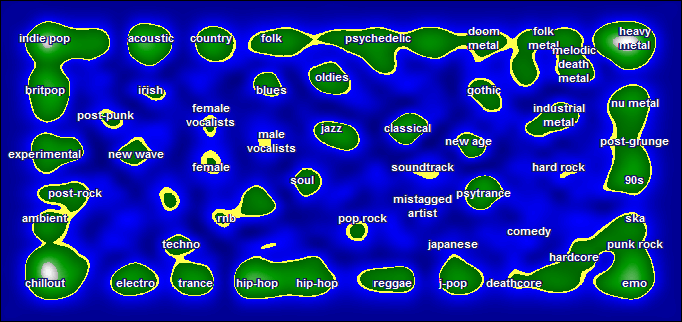
islands of music from last.fm

See the orginal version here, complete with mouseover descriptions of the different islands.  Visualizing music tatses as a map makes some interesting findings pop out – the long continent of folk, psychadelic, and metal in the northeast, for example.  Deathcore and emo are on the same continent, just on opposite sides of what I call You-Don’t-Understand-Me-Dad Bay.

This is an alternative to more conventional tag cloud or word cloud representations, though I’m not sure which presents information more clearly.

Another thing that strikes me is the similarity to video game maps – perhaps because of the iconic color palate.  Though we might think of them geographically, video game maps are equally artificial ways to relate to a big pile of numerical data.

World maps as Chinese zodiac

Artist Kentaro Nagai has used the continents (and major islands) as a medium to create the twelve signs of the Chinese zodiac.  See all of them here.

I particularly like the economy of arrangement in the rooster:
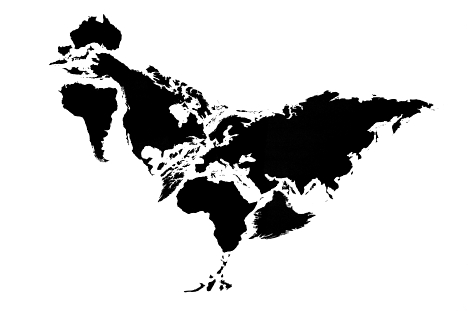
Rooster from Chinese zodiac

…and the sheep for it’s nice use of negative space.
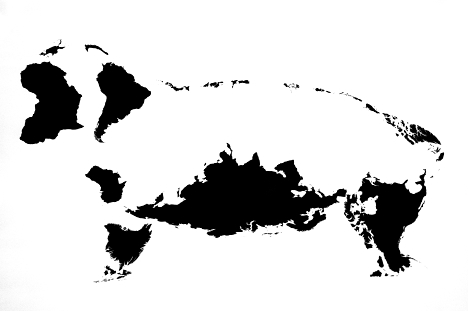
The sheep from the Chinese zodiac

Thanks to Chris for the link to the Zodiac

Word Clouds – what are they good for?

Friday, January 30th, 2009

ReadWriteWeb had an interesting post showing word clouds generated from Barack Obama’s inauguration speech. 

Obama Inauguration word cloud

But what are word clouds, and how are they useful? Word clouds visually represent the frequency or importance of a word in a given text. In President Obama’s speech, we can see from the cloud that he used words like “nation”, “new”, and “people” fairly often. You can use them to compare to texts in in a sort of qualitative way – does one text have a much sharper distribution than the other?

I would say that most of the time their primary purpose is aesthetic. I’m not convinced people really use them for anything other than as nice design elements – thought I think they have untapped potential. That’s why I created the Tag Altocumulus Wordpress Plugin, to try to integrate tag clouds into a site’s navigation system in a way that’s actually useful.

To generate the clouds they used Wordle, a very cool site that lets you create your own word clouds from any text.  Wordle gives you options on color, font, and orientation and you can end up with some pretty nice looking clouds. I went ahead and generated one from my paper on Tagging and Searching:

Wordle: Tagging and Searching

It does look pretty cool. Wordle also will generate a cloud from any site with an RSS feed. Here’s the cloud for my site:

Wordle: Blog cloud

Drop me a note in the comments below if you make one for your site or find an interesting text to use.

Update to Altocumulus Wordpress Tagging Plugin – version 0.2

Wednesday, August 6th, 2008

Screenshot of my tag cloud Wordpress plugin in action

Everyone has tag clouds all over the web, but are they really useful?  Altocumulus is an attempt to use tag clouds as a real navigational system in Wordpress blogs.

Install the plugin and it will automatically put a cloud of related tags at the top of all your Category and Tag pages.  Hopefully this will serve two purposes:

  1. Users who end up on a general category page can click through to a more specific (or more relevant) tag page, and
  2. It should give users a general idea of the topic of the posts on that archive page, increasing the information scent.

Next version I’ll add an options screen where you can change the number of tags, placement, etc.

Please drop me a note if you run into any bugs or are using it on your blog.  Let me know if you have any ideas you’d like to see implemented, too – I am all about implementing and studying folksonomies.  The more folks who are interested, the more likely I am to add features.  Thanks.

Download the Plugin Here

New WordPress plugin available – put tag clouds everywhere with Altocumulus

Tuesday, November 6th, 2007

If you’ve gone to any of my Category pages on this blog (my Academic papers, for example), you might have noticed I have a tag cloud with just the tags related to that category.  After I figured out how to do it I packaged it into a WordPress Plugin, called Altocumulus.

This goes along with my research interests into folksonomies and information retrieval.  I haven’t had the chance to study tag clouds empirically but my guess is that one giant tag cloud for an entire web site or blog might be more cool looking that useful for navigation.  I think that making use of tag relationships a bit more might show the strength of folksonomies for navigation.  So now, if you click to see my design pages, you can see the kinds of topics my designs cover.

For another example of this in action, take a look at Unsought Input, for example the Innovation page.

Go ahead and download version 0.1 now.   It requires WordPress 2.3 or higher.  This is my first WordPress plugin so I’m sure I’ll figure out ways to make it better over time.  If you have any bugs, pointers, or suggestions please leave them in the comments below.

Information visualizations and spatial maps on the web – Usability concerns

Thursday, October 23rd, 2003

Visualizing the web

Although web technologies are constantly changing, most users still browse the web the same way they did back in 1995–typing keywords into search boxes, clicking from home page, to section, to subsection on a navigation bar, or following link, to link, to link. The fact that it is called a “web” suggests that there should be other ways of navigating websites, and there are a number of projects attempting to employ information visualizations and spatial maps to do so.

All web pages organize information visually, but “information visualization centers around helping people explore or explain data that is not inherently spatial, such as that from the domains of bioinformatics, data mining and databases, finance and commerce, telecommunications and networking, information retrieval from large text corpora, software, and computer-supported cooperative work.” (“InfoVis 2003 Symposium”) Spatial metaphors are used to communicate different levels of information. A simple, static example would be a personal homepage built to look like the designers home, with links to favorite movies in the living room and recipes in the kitchen. A more advanced example would be a customer relationship management system for a large company which instead of presenting a list of technical support problems and solutions, displays an interactive map of problems, with more common problems in a larger font size, and recent problems in red. In both cases, users get an immediate grasp of complex information.

Such visualizations are intended to help solve two current web usability problems: the lack of a wide view to web structure, and the lack of query refinement based on relationships of retrieved pages (Ohwada 548). But they must do so without creating additional usability barriers. This paper will describe three current information visualization projects and describe some of the usability issues these sorts of projects face.

(more…)