Posts Tagged ‘web standards’

XHTML 2 vs HTML 5 and the href Attribute

Monday, June 2nd, 2008

Spider web window - common motif in the Winchester HouseI wrote a little earlier about what I was looking forward to in HTML 5.  I haven’t had a chance to really collect my thoughts about XHTML 2 vs HTML 5, to be honest I’d be happy to see progress on both fronts.  I do have to say I lost interest in XHTML 2 early on when it seemed they were throwing some baby out with the bathwater.  HTML is not the cleanest, most elegant language but the ease of picking it up is part of why the web grew so quickly.  Even if that has forced browsers to cope with millions of pages of clunky, broken HTML.

Eric Meyer has at least one point in XHTML 2’s favor - the ability to add and href attribute to anything, making it a link.  In addition to making the <a> tag jealous, this would let you do some pretty cool stuff like turn an entire table row into a link in a dynamic data reporting web app without a lot of Javascript or duplicated tags.

By the way Eric is a fellow member of the Cleveland Web Standards Association and a great speaker.  If you get a chance to see a talk by him you should really check it out.

Sphere: Related Content

The Cleveland Web Standards Association, Helvetica, and videoconferencing

Saturday, February 2nd, 2008

If you are a web developer or designer in the Cleveland area, I highly recommend dropping by the Cleveland Web Standards Association meetings. They just launched a new website, including a great aggregation of local web development blogs.

I started going to meetings last year and I have to say it’s a great group of people that host some really interesting discussions and speakers. And I’m not just saying that because they let me give a presentation a few months ago.

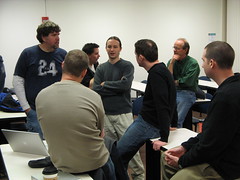
At the last meeting Eric Meyer took some photos - one makes me look really important:

CWSA Afterchat

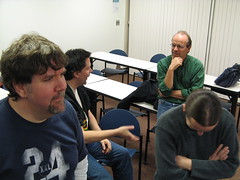
In the other, it looks like I dozed off in the middle of the discussion:

CWSA Afterchat

Oh well. The group screened the film Helvetica, which is the best movie I’ve ever seen about a typeface. I’d recommend it for anyone who has an interest in design, typography, or even 20th-century history.

Since I’ve moved out of town I won’t be able to make it to too many meetings in person. I want to set up videoconferencing, anyone have any recommendations for web cams, software, or services? I’m looking for something that is extremely easy to use, since my parents want to be able to do video calls too. I’ve heard some good things about Skype. Any thoughts?

Sphere: Related Content

The Top Ten Best Things About HTML 5

Sunday, December 30th, 2007

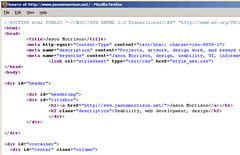
html-source The Word Wide Web has grown at an astounding pace and is pretty ingrained in a lot of our daily lives - you’re reading it right now. Part of the reason it has been so successful has been the flexibility and ease of use of the basic language of web pages, HTML.

Most web sites are developed in HTML 4 (first released in 1997) or XHTML (from 2000). Considering the rapid change all around the web, why hasn’t there been a new version, and what’s next for the Web? One reason we haven’t seen new versions is the aforementioned flexibility. There have been plenty of developments, from blogging software and other content management systems on the server side to CSS, AJAX, and embedded Flash video on the front end.

Microformats are a part of this and will be a big part of the future too. But all the web developers in the house should get up to speed on HTML 5, which looks to be the future of the Web.

I’ve been watching what the Web Hypertext Application Technology Working Group (WHATWG) has been doing with HTML 5 ever since I took a gander at the W3C’s XHTML 2 spec and figured out that they were mostly adding annoyance and removing backwards compatibility. Guys I respect, like Eric Meyer, seemed to agree. The WHATWG decided to work on their own ideas and came up with HTML, which was eventually adopted by the W3C as well.

I haven’t taken a look in a while but Marcia Zeng mentioned the HTML 5 spec in an email recently and it got me interested in checking back in. I have to say, for the most part, it’s looking very interesting.

So I decided to put together a quick list of my top 10 new things in HTML 5:

  1. The <nav> element. This will be great for the billions of navbars we web developers have been coding up for the past 10 years. Things like this will help reduce the problem of div soup and make structure more apparent.
  2. The <header> and <footer> elements. See the last entry and add in the billions of page headers and footers we’ve produced as well. Semantically meaningful tags like these can only help browser plugin writers, search engine programmers, and other hackers to come up with cool new features.
  3. The death of the dreaded <font> tag. This should have been banished as soon as CSS was widely supported. It was a pain in the rear to use back in the 1990s when coding by hand, and was even worse when inserted by GUI tools like FrontPage.
  4. The continued usefulness of the <img> element. You may be wondering how we could make web pages without the image element, but XHTML2 only included it grudgingly, recommending everyone use <object> instead. The problem is that just about anything could be an object, the tag is almost meaningless. Why not replace all tags with <thing>?
  5. The <audio> and <video> elements. There’s been some controversy about this, because the W3C originally recommended use of the open source Ogg formats but later recanted. Still, it will be nice to embed audio and video as easily and consistently as images are used now.
  6. New <input> types for dates, urls, etc. When you have a form that requires a user input a date or some other specialized data, you choices have been to present a plain text input or jazz things up with JavaScript to make it a bit more usable. HTML 5 adds specific types for these cases.
  7. The conenteditable API. This will be really interesting if it’s fully supported. In Tim Berners-Lee’s original vision for the web, documents would be easily editable. Wikis get us almost there, but a standard editing API would be even better.
  8. A required attribute for form inputs. This won’t mean we can stop checking incoming data on the server side (users can still POST arbitrary data with the right tools) but it should remove the need for millions of little field-checking JavaScripts.
  9. The <figure> and <legend> elements. This will make it a little easier to associate captions and other text to images. Look for CMSs and image search engines to take advantage of these tags.
  10. An open development process. Want to keep an eye on development? Got an idea or concern about the spec? Hop on one of the mailing lists. Open standards are great for promoting compatibility and competition, so open development of the standards just makes sense.

Sphere: Related Content

The power of microformats

Monday, December 3rd, 2007

Considering a Descent A few months ago I attended a really interesting talk by Eric Meyer where he touched on the use of microformats.  You might know Eric from his excellent O’Reilly Press CSS books.

What are microformats?  Before giving an example, I’ll give a little context.  When Tim Berners-Lee created the web, he tried to make HTML simple, flexible, and meaningful.  He succeeded on the first two counts but the third was quickly left by the wayside - many designers didn’t care what a particular tag meant, so long as it could be used for page layout.  The use of tables to arrange graphic elements instead of holding tabular data is a perfect example.

So Berners-Lee has been talking for years about the next step - the semantic web.  In the semantic web, tags are used to say what a particular piece of content is, with all styling done with stylesheets.  There is, of course, more to the semantic web than just separating content and presentation, after all you can work that way with HTML and CSS now.  One other key component is the web of trust, where people and web sites are able to describe relationships to each other so that search engines can help you find trustworthy content automatically.

Unfortunately, the semantic web has not really taken off.  There have been lots of meetings and XML schemas but it’s all too complicated, the process is too bureaucratic, and everything is being designed from the top down.

This is where microformats come in.  Let’s say you have a blog and you’ve tagged all your articles.  You’d like to let search engines and aggregators like Technorati know what your tags are.  But HTML doesn’t have anything like this:

<tag>semantic web<tag>

So what do you do?  Simple, use the rel-tag microformat:

<a href=”http://example.com/tag/semantic+web” rel=”tag”>semantic web</a>

The microformat makes use of existing html tags and attributes and just follows simple conventions.  But now that this little bit of meaning can be interpreted by spiders and other programs, we’ve actually added a pretty powerful bit of functionality to the web.

Most blog software, including WordPress, includes does microformatting for you.  If install my tag cloud plugin Altocumulous, and view source, you can see for yourself.

For intranet purposes, the hCard and hCalendar microformats look promising.  Take a look at microformats.org to see why I think so.  I’ll write more on it later.

Sphere: Related Content

The iPhone, Google Maps for Mobile, and e911 - where is the disconnect?

Wednesday, November 28th, 2007

DSCN0592Google Maps for Mobile will soon include a GPS-like ability to find your current location.  A little while ago Gizmondo wrote about an iPhone hack that allows almost, but not quite GPS functionality.  The hack itself sounds a lot like the way phase II of the wireless E911 service works, and my guess is that Google Maps is fairly similar.

If you take a look at this map, you can see than many states have > 80% deployment.  On the FCC site you can find reports of the e911 deployments completed by cell phone companies.  Any company that doesn’t have over 95% of their customers with E911 capable handsets is currently getting fined.  So it’s a shame that Google and random iPhone hackers have to reimplement all this.

I’ve never worked on E911 support (or anything cellular, for that matter), but it seems to me there is an incredible opportunity here.  One of the great things about the iPhone is that it drives adoption of data plans.  How about including psuedo-GPS capability in nearly every phone as soon as you sign up for a data plan?  That would be a huge incentive.

Here’s an even more radical idea:  why not come up with a standard way to communicate presence and location data so users can do things like local search?  It might take use years and millions of dollars to develop proprietary systems to do this, but if we use an open standard perhaps this could be adopted as quickly as things like the web and email.

Even better, operating under an open standard will allow geeks in garages all over the world to develop new social software systems we can’t even dream of.

Sphere: Related Content

Video Presentation on Tagging and Folksonomies

Wednesday, November 7th, 2007

Here’s the video of a presentation I gave at the Cleveland Web Standards Association last month (at the time of this posting the website is a little bare, check out the Meetup page for more details).

In this video I talk about the same topic as myTagging and Folksonomy article in the ASIST Bulletin. What are the different kinds of uses for social tagging and folksonomies and what are users’ motivations for tagging?

Jason Morrison - Tagging Systems & Folksonomies from Cleveland Web Standards on Vimeo.

I’m pretty happy to have been the next presenter after Eric Meyer. In this month’s meeting Brad Colbow talked about CSS positioning.What do you think? Feel free to leave a comment below.

Sphere: Related Content