XHTML 2 vs HTML 5 and the href Attribute

Spider web window - common motif in the Winchester HouseI wrote a little earlier about what I was looking forward to in HTML 5.  I haven’t had a chance to really collect my thoughts about XHTML 2 vs HTML 5, to be honest I’d be happy to see progress on both fronts.  I do have to say I lost interest in XHTML 2 early on when it seemed they were throwing some baby out with the bathwater.  HTML is not the cleanest, most elegant language but the ease of picking it up is part of why the web grew so quickly.  Even if that has forced browsers to cope with millions of pages of clunky, broken HTML.

Eric Meyer has at least one point in XHTML 2’s favor – the ability to add and href attribute to anything, making it a link.  In addition to making the <a> tag jealous, this would let you do some pretty cool stuff like turn an entire table row into a link in a dynamic data reporting web app without a lot of Javascript or duplicated tags.

By the way Eric is a fellow member of the Cleveland Web Standards Association and a great speaker.  If you get a chance to see a talk by him you should really check it out.

A Scary, but Fascinating Idea – Javascript and CSS hack to see where your users have been

Invasion of Segway infantry!

I just ran across this post on Aza Raskin’s blog about a technique used to cut down the number of social bookmarking links displayed to users.  I’m sure you’ve seen them–the 20 or so colorful buttons that have popped up at the bottom of every blog post on the web, for Digg, Del.icio.us and similar sites.  On my blog they are hidden behind the ShareThis Widget but Raskin had a better idea – why not just display the ones each user actually uses?

Impossible?  Not so fast – think about what happens when you visit a site.  After your visit any links to the site will change, usually from blue to purple.  We can put up links to each social bookmarking site and then use Javascript and CSS to check to see if each link has been visited.  If so, display the button, and if not, hide it.

This is a very cool way to manage buttons but the technique has wider privacy implications.  I could, for example, put links to…  questionable sites, and then use some Ajax to collect that information about users.  If I had other information about you (say you logged into my site or otherwise gave me an email address) I could link it together and build a database.

On the other hand, it’s not like I can grab your entire browsing history or follow you around after you leave my site – I have to specifically create a link and check it for every site I want to know about.  And unlike your browser history this info is cleared every time you close your browser.  So it’s not spyware or anything as intrusive as, say, the Alexa toolbar.

I can think of a bunch of cool ways to apply this technique, but I’m not sharing until I implement one.  Feel free to post any ideas (or misgivings) in the comments below.

Google Earth vs. Reality

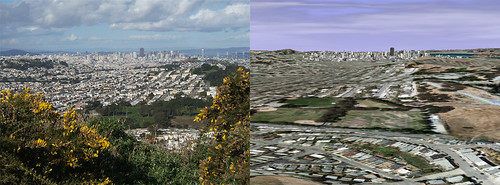
Google Earth is getting better and better and will soon be almost as good as actually being there. Don’t beleive me? I decided to pick a couple of shots and line up the same view in Google earth to compare. This first photo is from San Bruno Mountain (original photo here), showing the San Francisco skyline:

Google Earth vs. Reality - San Francisco

You should definitely click through to see the full-sized version. The version on the right is missing the flowers in the foreground and the clouds are a little different but otherwise it’s very recognizable.

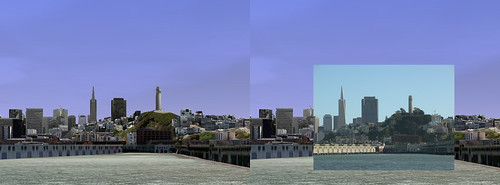
Here’s another shot of San Francisco, this one from the bay (original photo here). I thought this would show off the detail of some of the 3d buildings in Google Earth. I had a hard time lining up a large screenshot because the photo was taken at 8x zoom, but you get the idea.

Google Earth vs. Reality - San Francisco from the Bay

Again, you should click though to the full sized version to get the full effect.

What do you think? Will Google Earth evolve to the point where no one will ever need to travel? My guess is that people will still get wanderlust and until Google unveils a food modem you’ll have to go get the sourdough yourself.

Let me know if you liked these in the comments and I’ll do a few more.