Posts Tagged ‘youtube’

Art Blog blogging collaboration embedding Facebook Google Docs Google Spreadsheets internet liveblogging skype social networking social software South Park Usability user experience design video videoconferencing video sites

I Love Hospitals With WiFi, or Twittering Childbirth

Tuesday, December 2nd, 2008

When we were looking for hospitals and doctors offices for little Athena, wifi wasn’t really on the list so much as reputation, compatibility with our insurance, and other concerns.  In retrospect, though, thank goodness Stanford Hospital and Palo Alto Medical Foundation have wifi.

We live more than 2,000 miles from most of our family.  Not all of them could make the flight to California for the birth.  We also have too many friends around the country to possibly make all the phone calls we’d have liked to have made that night.  In addition, we had several thousand people all over the world wondering which name we would pick for our baby.

Because of internet connectivity, I was able to do a fair job of including all of them in the process:

1) With my iPhone, I was able to take and post photos during labor and delivery.  Photos of my mom’s new granddaughter were available for her, on Flickr, within minutes of birth:

Wrapped and swaddled

I’m not sure I can properly express here how much it meant to her and the rest of our family to be able to see Athena so quickly.

2)  Using the Twitterific App on my iPhone was was able to post updates to Twitter throughout the whole labor.  This is a perfect example of what Twitter is good for.  Liveblogging while my wife endures the pains of childbirth would be ridiculously insensitive, but there were always minutes of downtime here and there to tap out a few words describing what’s going on.
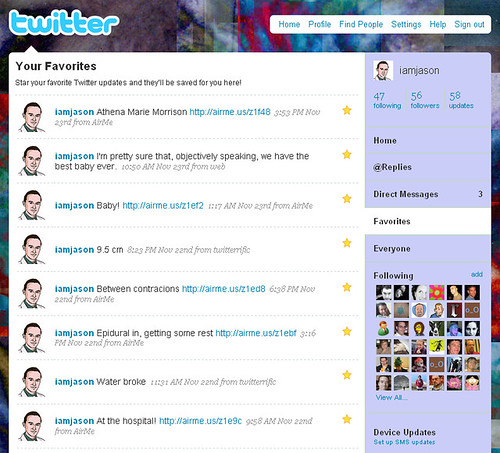
live-twittering

3)  Using the Twitter App for Facebook, my updates showed up on my Facebook status as well.  This was a big help, since so many more friends and family use Facebook than Twitter.

A fourth option, which we didn’t use but might have had the labor been longer, was videoconferencing with Skype.  We’ve been using Skype to keep in touch with family for some time.  It is currently my grandmother’s favorite thing to do.  Since we’ve been back home Athena has become the star of many family video sessions.

One final thing I have to mention is YouTube – we certainly weren’t going to share the gooey miracle of life with the world in streaming video, but my wife followed the videos fo several other women during pregancy up to and including labor.  We don’t know a lot of other couples having kids right now, so that gave Ann a personal connection with their stories and helped her through some of the tougher times during the last 9 months.  She could see that other people were going through the same things she was and that was an important comfort.

The common theme here, which I think goes a long way toward explaining the growth of the internet as a whole, is communication.  Because of almost universal connectivity, we were able to turn a deep personal experience into a social experience as well.

Google Spreadsheets as Social Art Medium

Friday, November 21st, 2008

I used Google Docs spreadsheets to pick a name for my baby. Here’s another interesting social use of spreadsheets.

Check out this YouTube video:

It’s amazing what people will think of once you put something mundane up on the web and give people the freedom to work together.

Appearance on The Morning Show in Australia

Tuesday, November 18th, 2008

Earlier I wrote about my experience on Australian TV. They’ve put the clip up on The Morning Show website but they don’t allow direct links or have an embedding feature, so I did some digging in the JS/Flash code and put it below.

They put in a photo montage so some of my family, friends, and co-workers are famous in Australia too.


If anyone wants to know how to embed videos from this site or other Yahoo TV sites, let me know and I’ll post more details. They really ought to just stick each video on it’s own URL and add some embed widgets. It’s not too hard to do, and it’s part of the reason YouTube became so popular.

Web Video Usability Review: South Park Studios

Monday, March 31st, 2008

After a few years of Youtube showing the world how to do video on the web, lots of traditional broadcasters and studios have started putting their content online. Part of the reason is to try to steal YouTube’s thunder – a more market-friendly tactic than just lawsuits. Many of these sites are trying to figure out an advertising model and make money, while others are obviously trying to get viewers more engaged by joining social networks, making mash-ups, etc.

But enough about their goals, what about user goals and experience? In web video the content may be king but usability is almost as important. If your user interface is difficult, confusing, or unpleasant, users will leave your site to get the content elsewhere.

So I’m going to try to do a usability review of various web video sites over the next few weeks. These won’t be formal reviews with user tests and cool eye-tracking heatmaps. Instead I’ll point out some user goals and hold up each site to the same rubrick.

The first site: SouthParkStudios.com

southpark-screenshot

So, what do users want out of web video? I can think of a number of scenarios: finding a particular clip or episode, watching recent episodes, sending a link to a friend or embedding a clip in a blog, and , well, just enjoying the show.

Selection

Score: 4 out of 4 points. This site has everything – every show from every season.

Finding Particular Videos

Method: I’m taking a cue from the creators of Friends – people don’t remember episode names. So I’ll be doing a Google search for the show name and “the one where” and taking the first relevant result. In this case it’s “the one where Ben Affleck has a relationship with Cartman’s Jennifer Lopez hand” (without quotes).

Score: 2 out of 4 points. The search fails, but a simpler query for “Ben Affleck” leads us right to the clips. The full episode is available.

Watching Videos

How easy is it to watch videos? What’s the quality?

Score: 4 out of 4. It’s immediately apparent what to click on to see an episode or clip. You can watch videos full screen and South Park’s animation lends itself well to compressed video. The navigation between episodes is pretty nice, with thumbnails of all episodes for that season along the bottom of the window.

Linking to Videos

Score: 3 out of 4 points. The URL for each clip and episode is available by clicking the “Share” button. Clips open up in the main window so if you can get the link like any other web page. The only lost point is the fact the episodes open in new windows – what is the point? It takes away my browser toolbar and any social bookmaking toolbars or extensions I might normally use.

Embedding videos

Let’s give it a try:

Score: 3 out of 4 points. Once again use the Share button to get the embed code. They lose a point for not allowing embedding of full episodes – they probably have good reasons for not wanting users to do so, but we’re only concerned about the user’s side of things right now.


Advertising

Score: 3 out of 4 points. Ads are shown before the video (for clips) or at two break points about halfway through (for full episodes). Commercials are short and don’t obscure video or interrupt the show more than normal TV commericals would. They lose a point, though, because of the lack of variety – I watched a few episodes and plenty of clips and only saw two different commercials, over and over again.

Audio Experience

I’m going in go with a slightly different scale this time: introducing the patented Bleeding Ear Scale of Web Video Volume.

You may have noticed that some TV stations play their commercials a little louder than the show. The theory I’ve always heard is that they want you catch your attention even if you get up to go to the fridge.

Score:

bleeding earbleeding earbleeding earbleeding ear

Unfortunately, most people don’t watch web video the same way they watch TV – they’re usually sitting much, much closer to the speakers or wearing headphones. The bone-shattering difference in volume between the video and the commercials on SouthParkStudios.com earned the site four bleeding ears.

Total score: 19 out of 24 points, with a special note to dive for the volume button whenever an ad is coming up.