Archive for December, 2007

The Top Ten Best Things About HTML 5

Sunday, December 30th, 2007

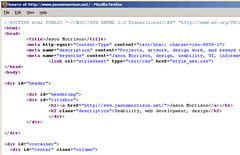
html-source The Word Wide Web has grown at an astounding pace and is pretty ingrained in a lot of our daily lives - you’re reading it right now. Part of the reason it has been so successful has been the flexibility and ease of use of the basic language of web pages, HTML.

Most web sites are developed in HTML 4 (first released in 1997) or XHTML (from 2000). Considering the rapid change all around the web, why hasn’t there been a new version, and what’s next for the Web? One reason we haven’t seen new versions is the aforementioned flexibility. There have been plenty of developments, from blogging software and other content management systems on the server side to CSS, AJAX, and embedded Flash video on the front end.

Microformats are a part of this and will be a big part of the future too. But all the web developers in the house should get up to speed on HTML 5, which looks to be the future of the Web.

I’ve been watching what the Web Hypertext Application Technology Working Group (WHATWG) has been doing with HTML 5 ever since I took a gander at the W3C’s XHTML 2 spec and figured out that they were mostly adding annoyance and removing backwards compatibility. Guys I respect, like Eric Meyer, seemed to agree. The WHATWG decided to work on their own ideas and came up with HTML, which was eventually adopted by the W3C as well.

I haven’t taken a look in a while but Marcia Zeng mentioned the HTML 5 spec in an email recently and it got me interested in checking back in. I have to say, for the most part, it’s looking very interesting.

So I decided to put together a quick list of my top 10 new things in HTML 5:

  1. The <nav> element. This will be great for the billions of navbars we web developers have been coding up for the past 10 years. Things like this will help reduce the problem of div soup and make structure more apparent.
  2. The <header> and <footer> elements. See the last entry and add in the billions of page headers and footers we’ve produced as well. Semantically meaningful tags like these can only help browser plugin writers, search engine programmers, and other hackers to come up with cool new features.
  3. The death of the dreaded <font> tag. This should have been banished as soon as CSS was widely supported. It was a pain in the rear to use back in the 1990s when coding by hand, and was even worse when inserted by GUI tools like FrontPage.
  4. The continued usefulness of the <img> element. You may be wondering how we could make web pages without the image element, but XHTML2 only included it grudgingly, recommending everyone use <object> instead. The problem is that just about anything could be an object, the tag is almost meaningless. Why not replace all tags with <thing>?
  5. The <audio> and <video> elements. There’s been some controversy about this, because the W3C originally recommended use of the open source Ogg formats but later recanted. Still, it will be nice to embed audio and video as easily and consistently as images are used now.
  6. New <input> types for dates, urls, etc. When you have a form that requires a user input a date or some other specialized data, you choices have been to present a plain text input or jazz things up with JavaScript to make it a bit more usable. HTML 5 adds specific types for these cases.
  7. The conenteditable API. This will be really interesting if it’s fully supported. In Tim Berners-Lee’s original vision for the web, documents would be easily editable. Wikis get us almost there, but a standard editing API would be even better.
  8. A required attribute for form inputs. This won’t mean we can stop checking incoming data on the server side (users can still POST arbitrary data with the right tools) but it should remove the need for millions of little field-checking JavaScripts.
  9. The <figure> and <legend> elements. This will make it a little easier to associate captions and other text to images. Look for CMSs and image search engines to take advantage of these tags.
  10. An open development process. Want to keep an eye on development? Got an idea or concern about the spec? Hop on one of the mailing lists. Open standards are great for promoting compatibility and competition, so open development of the standards just makes sense.
Sphere: Related Content

When graphics lie

Sunday, December 16th, 2007

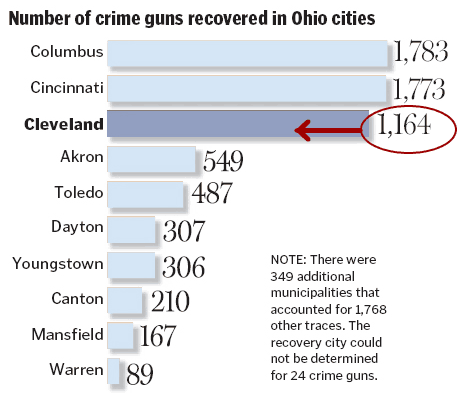
The Cleveland Plain Dealer ran a story today about the origin of guns used in crimes in the city. This is an issue that people are concerned about and it deserves coverage. Rather than present information about gun laws in various states and numbers of crime gun recovered as a boring list, the PD provided a helpful infographic.

Maps and bar charts can be really useful tools to help people make sense of information. But look closely and you’ll see a problem - the bar chart showing the relative number of crime guns recovered is wrong:

pd-chart-error

At first glance it looks like about as many guns are recovered from Cleveland as from Cincinatti and Columbus. But the Cleveland number is really about 65% of the Columbus number.

This is probably just an error, akin to misspelling someone’s name in an article. But it’s a good example of a bad graphic, sometimes called chartjunk. Ignoring the error, a bar chart like this might conceal more than it conveys. The top three cities are much larger than the rest, so wouldn’t we expect them to have more guns seized? Maybe a measure per 1000 persons would be better. We also need to think about what this chart implies to readers - is a higher number worse, because it correlates to more crimes, or better, because it means police departments are doing a good job of taking guns off the streets?

If you’re interested in reading more about how to design good graphics and communicate large amounts of data effectively, take a look at the books of Edward Tufte.

Sphere: Related Content

48 Hours with an iPhone

Wednesday, December 5th, 2007

Okay, so I’ve had my iPhone for a while now, but back when I got it I took a few notes about my first impressions.  I thought I’d clean them up a bit and post my thoughts for anyone who still on the fence about buying one.

I, like a lot of you, have been following the iPhone since it was just a twinkle in Steve Jobs’ eye.  Hundreds of bloggers and journalists have written about the device.  Now that I’ve had one for two days, does it meet the hype?

Before I write down a few thoughts, I have to say that my wife got me the iPhone as an anniversary present.  My Treo 650 has become increasingly frustrating, freezing up silently and making it impossible to get in touch with me.  I’ve also been informed that this counts as Christmas 2007 as well, which is fine by me.

My first experience with the iPhone was a bit frustrating.  My main desktop is still on Windows 2000.  Unfortunately, even though I had the latest version of iTunes, I needed Windows XP, Vista, or OSX to sync with the iPhone.  I had to activate the phone using my wife’s iBook.  Activation was very quick and painless - as a current AT&T customer who already has a data plan and iTunes account I would imagine I’m the ideal case.

The iPhone does a lot of things very well.  Safari is a great web browser, with one caveat I’ll talk more about below.  The large, high resolution screen makes web surfing a much better experience than my Treo.  The screen is amazingly bright - I have it set at the default, halfway setting and could still read everything easily in the bright sun.  I love the way it picks up nearby wifi networks and then remembers once you’ve okayed a particular one - at home, web surfing is very fast.  Surfing on the AT&T network is noticeably slower but usable.  At least once or twice it seemed to stall completely.

I put a few mp3s and photos on it and the process is pretty painless.  So far iTunes seems a lot easier to use than the Palm Desktop software for my Treo which always seemed a little odd to me.

How does it work as a phone?  Very well.  The speakerphone is loud and clear and everyone on the other end has told me I sound great.  I even took a work call on a Sunday night, and it seemed everyone else on the bridge had background noise problems but me.

The biggest frustration for me so far (other than the incompatibility issues) has been that Safari is so much like a real browser that it tricked me into thinking it was a real browser.  I’ll explain.  I have some photos up on Flickr and my wife was using her iBook so I thought I would just grab photos online instead of syncing them.  No dice.  There’s no way to actually save pictures, or anything for that matter, from the web.  Now I know Safari can save things, that’s how web browsers work, they download and cache files to display them to you.  So why is it impossible to save a photo to my photos?  I wonder if this is Apple trying to make it simpler for novice users or AT&T trying to keep people from skipping services somehow.

Either way it’s disappointing.  It shows you why so many people are rushing to hack the iPhone - there’s a lot of untapped potential there.

I mentioned that iTunes was easy to use, but the syncing process does have one fatal flaw: I can’t seem to figure out how to do a real backup, other than syncing again to a recent version of Outlook.  I really just want a file system I can copy to a CD (or better yet, let Mozy automatically back up).

Anyone else have an iPhone?  Please let me know your thoughts in the comments below.

Sphere: Related Content

The power of microformats

Monday, December 3rd, 2007

Considering a Descent A few months ago I attended a really interesting talk by Eric Meyer where he touched on the use of microformats.  You might know Eric from his excellent O’Reilly Press CSS books.

What are microformats?  Before giving an example, I’ll give a little context.  When Tim Berners-Lee created the web, he tried to make HTML simple, flexible, and meaningful.  He succeeded on the first two counts but the third was quickly left by the wayside - many designers didn’t care what a particular tag meant, so long as it could be used for page layout.  The use of tables to arrange graphic elements instead of holding tabular data is a perfect example.

So Berners-Lee has been talking for years about the next step - the semantic web.  In the semantic web, tags are used to say what a particular piece of content is, with all styling done with stylesheets.  There is, of course, more to the semantic web than just separating content and presentation, after all you can work that way with HTML and CSS now.  One other key component is the web of trust, where people and web sites are able to describe relationships to each other so that search engines can help you find trustworthy content automatically.

Unfortunately, the semantic web has not really taken off.  There have been lots of meetings and XML schemas but it’s all too complicated, the process is too bureaucratic, and everything is being designed from the top down.

This is where microformats come in.  Let’s say you have a blog and you’ve tagged all your articles.  You’d like to let search engines and aggregators like Technorati know what your tags are.  But HTML doesn’t have anything like this:

<tag>semantic web<tag>

So what do you do?  Simple, use the rel-tag microformat:

<a href=”http://example.com/tag/semantic+web” rel=”tag”>semantic web</a>

The microformat makes use of existing html tags and attributes and just follows simple conventions.  But now that this little bit of meaning can be interpreted by spiders and other programs, we’ve actually added a pretty powerful bit of functionality to the web.

Most blog software, including WordPress, includes does microformatting for you.  If install my tag cloud plugin Altocumulous, and view source, you can see for yourself.

For intranet purposes, the hCard and hCalendar microformats look promising.  Take a look at microformats.org to see why I think so.  I’ll write more on it later.

Sphere: Related Content

Here come the iPhone killers…

Saturday, December 1st, 2007

DSCN1935-1Nokia has announced a new phone, the N81, which looks suspiciously similar to a certain Apple phone.  What’s more, Nokia is launching a music download service which will allow people to download songs directly to the phone, instead of going through iTunes on their Mac or PC as iPhone users must.

Is this a bad sign for Apple?  Does it mean Apple had merely a fleeting lead over the competition?

I wouldn’t worry too much.  Nokia is a successful company that makes some great phones, but  Apple is playing a completely different game, the game that Motorola played with the Razr.  When it first came out, people heard about the Razr, they knew what it was, and they knew it was very thin and stylish.  After the success of the Razr other manufacturers came out with thin phones, but apparently copying the form factor and giving the device a serialnumberesque name is not enough.

My guess is it will be the same with the iPhone - every time Nokia tells the press and customers “The N81 is just as great as the iPhone” people will hear “Mumble mumble great mumble iPhone.”  I’m not a marketing expert, but it seems like a branding mistake to me.

The real way to steal the iPhone’s thunder is to figure out what people would like to do with a mobile device and an internet connection and better support that user experience.  From the review on Gigaom, I’m not sure that’s the case here.

Sphere: Related Content