Monthly Archives: August 2008

Map App of the Day: A genetic map of Europe

I’m a bit of a map geek and a big fan of using maps to convey information geographic and otherwise, so I’m starting a new series of posts – Map App of the Day.  I’ll highlight either a mapping web application or an application of mapping in information design that’s interesting, innovative, or just plain strange.

The New York Times had a brief article about a new study of genetic relationships between peoples in Europe.  The paper, by Lao et al., looked at genotype data from more than 2000 individuals spread throughout Europe.  The map on the right shows the normal geographic map of Europe, while the one on the left maps the genetic relationships between countries.
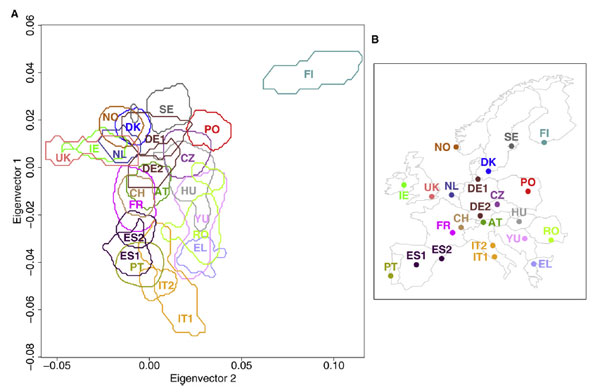
Here’s a link to a larger version on Current Biology’s web site.

The genetic map is a great example of why you should always consider mapping to illustrate data with a geographic component, and why you should always consider breaking the rules a bit  to get a good representation (most maps don’t show countries overlapping, for example).

This is also a great illustration of how permeable and impermanent national borders really are.  It would be interesting to see the same analysis done with distinctive populations like the Basque in Spain and the Sami in Finland added.

This also brings up with two non-mapping issues about journalism and research.  First off, the NYT article didn’t bother to actually link to the journal article, the researcher’s websites at their respective institutions, or any of the other places that readers would need to go to follow up on this paper or get more detailed information.  Why not?

Second, when I searched for Current Biology I was delighted to see that the journal publishes everything online, available via regular Google search, rather than hiding behind some expensive and proprietary publication database.  Open access is very cool.

What do you do when Windows won’t even boot?

Shattered tempered glass still in the frame Several jobs ago I did some phone tech support, and I have been the official “computer guy” for friends and family for as long as I can remember.  This means I have spent far more hours of my life trying to resuscitate dying PCs than I’d like to admit.

My brother’s computer has gone belly up and he’d like to get photos and other important files off his old hard drive.  I thought I’d share my thoughts with the rest of the world as well.

So, something is preventing Windows from even booting.  I’m not there to make an in-depth diagnosis, but it could be due to some corruption on your hard drive or some other strange hiccup with the files that are important to Windows.  You really have three options:

1.  Try to figure out what’s wrong and fix Windows.  This is time consuming, frustrating, and might not be possible in the end.
Pros:  Maybe it will be easy to fix and you’ll be back to work, right where you left off.
Cons:  Most likely it will be a huge pain and there’s a good chance you won’t be able to get it working.

2.  Buy a new hard drive, install it in your old computer, then install a new copy of Windows and important apps.  Now plug in your old hard drive as a second drive so you can copy files off of it.  Make sure you pull photos and other important files first, since it’s possible your old hard drive is failing and will eventually just die.
Pros:  A new hard drive isn’t too expensive, this is a good option if your computer is relatively new and fast and you don’t want to toss it.
Cons:  You have to waste a bunch of time installing Windows and whatever other software you need.

3.  Buy a hard drive enclosure, put your old hard drive in it, and then plug it in to a new computer and/or laptop so you can copy files off of it.  Again, make sure you pull photos and other important files first.  This is a good option if you already have a new computer lying around or if your old computer was getting slow and obsolete and you want to get a new one anyway.
Pros:  Hard drive enclosures are pretty cheap.  You can plug your old hard drive in just about anywhere to get your files.
Cons:  If you don’t happen to have another computer sitting around (or weren’t planning on buying one) this is the most expensive option.

Of course, if this is your work PC, you have a fourth option – give it to your company’s desktop support and let them deal with it.

And no matter which option you pick, remember that it’s only a matter of time before your computer has some sort of problem, so figure out a way to backup everything you really need.

Update to Altocumulus WordPress Tagging Plugin – version 0.2

Screenshot of my tag cloud WordPress plugin in action

Everyone has tag clouds all over the web, but are they really useful?  Altocumulus is an attempt to use tag clouds as a real navigational system in WordPress blogs.

Install the plugin and it will automatically put a cloud of related tags at the top of all your Category and Tag pages.  Hopefully this will serve two purposes:

  1. Users who end up on a general category page can click through to a more specific (or more relevant) tag page, and
  2. It should give users a general idea of the topic of the posts on that archive page, increasing the information scent.

Next version I’ll add an options screen where you can change the number of tags, placement, etc.

Please drop me a note if you run into any bugs or are using it on your blog.  Let me know if you have any ideas you’d like to see implemented, too – I am all about implementing and studying folksonomies.  The more folks who are interested, the more likely I am to add features.  Thanks.

Download the Plugin Here